Holding Report Output in ibi FOCUS Format
Whether issued within a request or after the request has been executed, the HOLD command can create a FOCUS data source and a corresponding Master File from the data extracted by the report request. This feature enables you to create:
- A FOCUS data source from any other supported data source type.
- A subset of an existing FOCUS data source.
Create HOLD Files in ibi FOCUS Format
ON TABLE HOLD [AS filename] FORMAT FOCUS [INDEX field1 field2 ...]
After a report request is run, use
HOLD [AS filename] FORMAT FOCUS [INDEX field1field2...]
where:
The name can be up to 64 characters long.
Enables you to index FOCUS fields. All fields specified after INDEX are specified as FIELDTYPE=I in the Master File. Up to four fields can be indexed.
Note that once you use this format from Hot Screen, you cannot issue another HOLD command while in the same Hot Screen session.
Operating System Notes for HOLD Files in ibi FOCUS Format
The HOLD file is dynamically allocated if it is not currently allocated. This means the system may delete the file at the end of the session, even if you have not done so. Since HOLD files are usually deleted, this is the desired default. However, if you want to save the Master File, allocate it to ddname HOLDMAST as a permanent data set. The allocation can be performed in the standard FOCUS CLIST. For example:
ALLOC F(HOLDMAST) DA('qualif.HOLDMAST') SHR REUSE
Note that ddname HOLDMAST must not refer to the same data set referred to by the MASTER and FOCEXEC ddnames.
Controlling the ibi FOCUS File Structure
The structure of the FOCUS data source varies according to the report request. The rules are as follows:
- Each aggregation command (SUM, COUNT, WRITE) creates a segment, with each new BY field in the request becoming a key. In a request that uses multiple display commands, the key to any newly created segment does not contain keys that are in the parent segment.
- If a PRINT or LIST command is used to create a segment, all the BY fields, together with the internal FOCLIST field, form the key.
- All fields specified after INDEX are indexed; that is, FIELDTYPE=I is specified in the Master File. Up to four fields may be indexed.
- If the data in the HOLD file is longer than a page (4K for FOCUS data sources or 16K for XFOCUS data sources), it cannot be stored in a single segment. Data that is too long to become a single segment will become a parent segment with unique child segments. For a FOCUS data source, the fields will be grouped into normal FOCUS page size segments and added as unique segments up to the total maximum of 32K of data. For an XFOCUS data source, the root segment can hold the first 16K of data, and additional data up to the 32K total, will be placed in a single unique segment. BY fields must all occur in the portion of the data assigned to the root segment.
To control whether the ACCEPT and TITLE attributes are propagated to the Master File associated with the HOLD file, use the SET HOLDATTR command. To control the FIELDNAME attribute in the Master File of the HOLD file, use the SET ASNAMES command. For more information on how to control the TITLE, ACCEPT, and FIELDNAME attributes in a HOLD Master File, see Controlling Attributes in HOLD Master Files.
Creating a HOLD File in ibi FOCUS Format
The following example creates a subset of the CAR data source.
TABLE FILE CAR
SUM SALES BY COUNTRY BY CAR BY MODEL
ON TABLE HOLD AS X1 FORMAT FOCUS
END
This request creates a single-segment FOCUS data source with a SEGTYPE of S3 (because it has three BY fields) named X1.
The X1 Master File is created by the request:
FILE=X1, SUFFIX=FOC
 SEGMENT=SEG01 ,SEGTYPE=S03
  FIELDNAME=COUNTRY      ,ALIAS=E01    ,USAGE=A10   ,$
  FIELDNAME=CAR          ,ALIAS=E02    ,USAGE=A16   ,$
  FIELDNAME=MODEL        ,ALIAS=E03    ,USAGE=A24   ,$
  FIELDNAME=SALES        ,ALIAS=E04    ,USAGE=I6    ,$
Using PRINT to Create a ibi FOCUS Data Source With a FOCLIST Field
This example creates a single-segment FOCUS data source with a SEGTYPE of S4 because of the three BY fields and the FOCLIST FIELD.
TABLE FILE CAR
PRINT SALES BY COUNTRY BY CAR BY MODEL
ON TABLE HOLD AS X2 FORMAT FOCUS INDEX MODEL
END
The Master File created by this request is:
FILE=X2, SUFFIX=FOC
 SEGMENT=SEG01, SEGTYPE=S04
  FIELDNAME=COUNTRY      ,ALIAS=E01    ,USAGE=A10   ,$
  FIELDNAME=CAR          ,ALIAS=E02    ,USAGE=A16   ,$
  FIELDNAME=MODEL        ,ALIAS=E03    ,USAGE=A24   ,FIELDTYPE=I,$
  FIELDNAME=FOCLIST      ,ALIAS=E04    ,USAGE=I5    ,$
  FIELDNAME=SALES        ,ALIAS=E05    ,USAGE=I6    ,$
Creating a Two-Segment ibi FOCUS Data Source
The following request contains two SUM commands. The first, SUM SALES BY COUNTRY, creates a segment with COUNTRY as the key and the summed values of SALES as a data field. The second, SUM SALES BY COUNTRY BY CAR BY MODEL, creates a descendant segment, with CAR and MODEL as the keys and SALES as a non-key field.
The COUNTRY field does not form part of the key to the second segment. COUNTRY is a key in the path to the second segment. Any repetition of this value is redundant.
TABLE FILE CAR
SUM SALES BY COUNTRY
SUM SALES BY COUNTRY BY CAR BY MODEL
ON TABLE HOLD AS X3 FORMAT FOCUS
END
This creates a two-segment FOCUS data source:
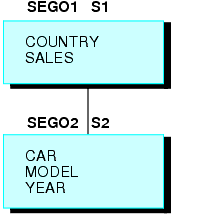
The Master File for this newly-created FOCUS data source is:
FILE=X3, SUFFIX=FOC
 SEGMENT=SEG01, SEGTYPE=S01
  FIELDNAME=COUNTRY       ,ALIAS=E01    ,USAGE=A10    ,$
  FIELDNAME=SALES         ,ALIAS=E02    ,USAGE=I6     ,$
 SEGMENT=SEG02, SEGTYPE=S02,PARENT=SEG01
  FIELDNAME=CAR           ,ALIAS=E03    ,USAGE=A16    ,$
  FIELDNAME=MODEL         ,ALIAS=E04    ,USAGE=A24    ,$
  FIELDNAME=SALES         ,ALIAS=E05    ,USAGE=I6     ,$
Creating a Three-Segment ibi FOCUS Data Source
In this example, each display command creates one segment.
The key to the root segment is the BY field, COUNTRY, while the keys to the descendant segments are the new BY fields. The last segment uses the internal FOCLIST field as part of the key, since the display command is PRINT.
TABLE FILE CAR
SUM SALES BY COUNTRY BY CAR
SUM SALES BY COUNTRY BY CAR BY MODEL
PRINT SALES BY COUNTRY BY CAR BY MODEL BY BODY
ON TABLE HOLD AS X4 FORMAT FOCUS INDEX COUNTRY MODEL
END
The Master File is:
FILE=X4, SUFFIX=FOC
 SEGMENT=SEG01, SEGTYPE =S02
  FIELDNAME=COUNTRY   ,ALIAS=E01     ,USAGE=A10   ,FIELDTYPE=I,$
  FIELDNAME=CAR       ,ALIAS=E02     ,USAGE=A16   ,$
  FIELDNAME=SALES     ,ALIAS=E03     ,USAGE=I6    ,$
 SEGMENT=SEG02, SEGTYPE =S01 ,PARENT=SEG01
  FIELDNAME=MODEL     ,ALIAS=E04     ,USAGE=A24   ,FIELDTYPE=I,$
  FIELDNAME=SALES     ,ALIAS=E05     ,USAGE=I6    ,$
 SEGMENT=SEG03, SEGTYPE =S02 ,PARENT=SEG02
  FIELDNAME=BODYTYPE  ,ALIAS=E06     ,USAGE=A12   ,$
  FIELDNAME=FOCLIST   ,ALIAS=E07     ,USAGE=I5    ,$
  FIELDNAME=SALES     ,ALIAS=E08     ,USAGE=I6    ,$