Copyright © Cloud Software Group, Inc. All Rights Reserved


Chapter 4 Building Custom Controls and Layouts : Layout Editor

Layout Editor
TIBCO BusinessWorks FormBuilder includes the Layout Editor utility for designing custom layouts. This editor is meant for simple operations, such as adding and resizing panes.
For complex template modifications, use a third-party HTML editor.
To Use the Layout Editor
1.
The Layout Editor buttons are added to the right of the TIBCO Designer’s toolbar.
Figure 24 TIBCO Designer Toolbar.
Use the Layout Editor buttons to edit the project in the design panel.
To Edit Properties
1.
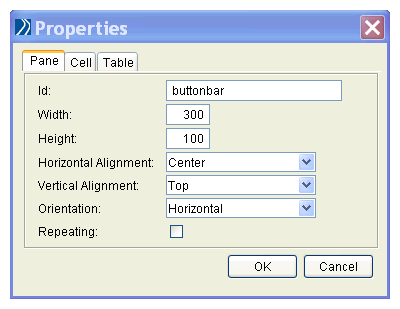
Each layout element has a set of properties that can be modified. To display the Properties dialog, select the Panes resource, and do one of the following:
2.
Figure 25 Properties Dialog
Most properties map directly to HTML table attributes for the specific element type. To check table and cell properties field names, look at the table in the section Pane, Table and Cell Properties.

Copyright © Cloud Software Group, Inc. All Rights Reserved