Copyright © Cloud Software Group, Inc. All Rights Reserved


Chapter 7 Deploying Formflow Applications : Summary of Pre-Deployment Steps

Summary of Pre-Deployment Steps
After installation, you must create a project with a formflow, build an EAR file, create an application definition in TIBCO Administrator, and then deploy the application.
1.
In TIBCO Designer, build an Enterprise Archive (EAR file) for the formflow project. This file contains a FormBuilder Archive resource. For instructions, see Enterprise Archive (EAR).
2.
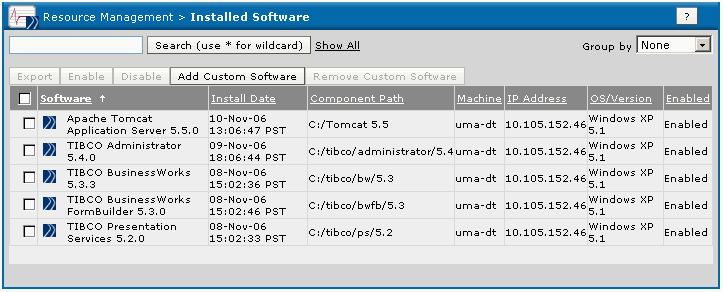
In TIBCO Administrator, click Installed Software.
The Installed Software screen shows all installed software components.
Figure 45 Installed Software Screen
If necessary, use Domain Utility to add machines to the domain and register components required for deployment on the machines. For instructions, see Chapter 2.
3.
If TIBCO BusinessWorks and TIBCO BusinessWorks FormBuilder are not shown in this module, try restarting TIBCO Hawk Agent before proceeding.

Copyright © Cloud Software Group, Inc. All Rights Reserved