Copyright © Cloud Software Group, Inc. All Rights Reserved


Chapter 7 Deploying Formflow Applications : Running a Servlet Engine

Running a Servlet Engine
A running servlet engine is required to deploy an application, and for running FormBuilder Desktop. A TIBCO BusinessWorks engine runs in the same process as the servlet engine, processing formflows and related automated processes.
When you register a servlet engine using Domain Utility, a script for starting the servlet engine is automatically created in the following directory: tra_install_dir\domain\domain_name\servlet container name\bin.
For Apache Tomcat, the name of the file is tra_install_dir\domain\domain_name\Tomcat\bin\start-port.bat.
Before starting a servlet engine, make sure the TIBCO Administrator server for the domain where the servlet engine is registered, and the TIBCO Hawk Agent are both running. For instructions, see TIBCO Administrator User’s Guide.
To install and to add a servlet engine to a domain, refer to Installing a Servlet Engine. To read more about deploying applications, see TIBCO Administrator User’s Guide
Running Tomcat
 
The Apache Tomcat software used for BusinessWorks FormBuilder can host only one BusinessWorks FormBuilder application. Therefore, you cannot have any of the following:
Starting a Servlet Engine
For all servlet engines, the startup script can be found in the following directory: tra_install_dir/domain/domain_name/servlet container name/bin
 
To Start Tomcat
On Windows, log in using an account with administrator privileges. On UNIX, start Tomcat with the same UNIX account that is used to run other TIBCO products, such as TIBCO Hawk, TIBCO Administrator, and so on.
On Windows: tra_install_dir\domain\domain_name\Tomcat\bin\start-port.bat
On UNIX:
tra_install_dir/domain/domain_name/Tomcat/bin/start-port.sh
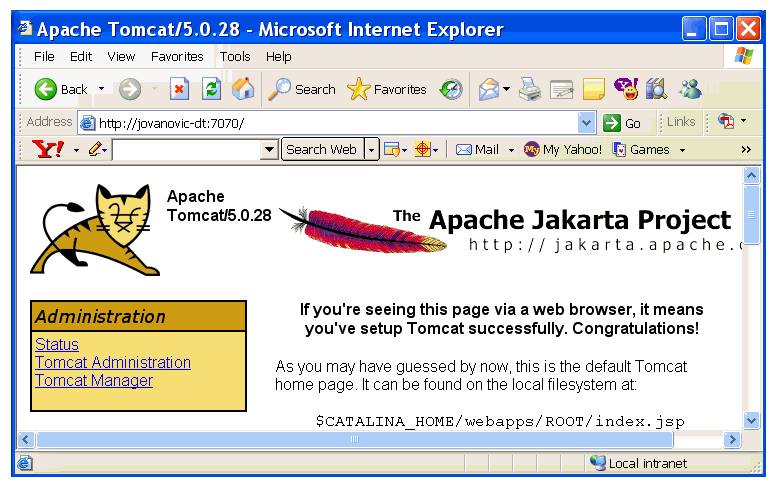
To Verify that Tomcat is Running
1.
Open your Web browser and type http://machine_name : port number
2.
Figure 46 Tomcat Running
The Tomcat log file is located in the directory installation_directory/tomcat/logs/.
On Windows, this directory will look such as the following:
C:\Program Files\Apache Software Foundation\Tomcat version\logs\localhost_log.YYYY-MM-DD.txt
Tomcat will be restarted by the deployment process. If you see that Tomcat has stopped in this window, keep in mind that it is a part of the process.
Stopping a Servlet Engine
For all servlet engines, the stop script can be found in the following directory: tra_install_dir/domain/domain_name/servlet container name/bin
To Stop Tomcat
On Windows: tra_install_dir\domain\domain_name\Tomcat\bin\shutdown-port.bat
On UNIX:
tra_install_dir/domain/domain_name/Tomcat/bin/shutdown-port.sh

Copyright © Cloud Software Group, Inc. All Rights Reserved