Copyright © Cloud Software Group, Inc. All Rights Reserved


Chapter 7 Deploying Formflow Applications : Troubleshooting Deployment

Troubleshooting Deployment
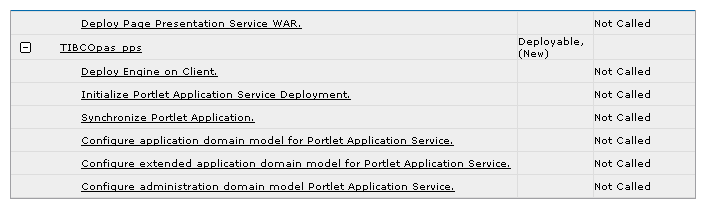
If deployment is not successful, a failure message displays in the Deployment Status column. To view more detailed information, click the History button, then click the Details link.
The History tab list all the steps of deployment, and the status of each step. You can easily find the problem steps that occurred during deployment.
Figure 56 Check History Tab for Deployment Status
To Redeploy After Deployment Fails
The following procedure is described for the Apache Tomcat servlet engine, and the steps 2 through 7 are specific to this servlet container. For other servlet containers, refer to the documentation provided their vendors.
When deployment fails, you need to perform following steps before redeploying.
1.
2.
3.
4.
In the directory tomcat_install_dir/server/webapps/, delete the web applications (folders) related to TIBCO BusinessWorks FormBuilder. Default names of these applications are:
Note that you may have changed these default names earlier using the Application tab in the TIBCO Administrator console.
Do not delete folders admin and manager. These are the default web applications shipped with Tomcat.
5.
In the directory tomcat_install_dir/conf/Catalina/localhost/, delete the xml files related to TIBCO BusinessWorks FormBuilder. Default names of these files are:
Note that you may have changed these default names earlier using the Application tab in the TIBCO Administrator console.
Do not delete admin.xml, manager.xml, and balancer.xml. These are the default web applications shipped with Tomcat.
6.
7.
8.
Delete all content of the directory tra_install_dir/domain/domain_name/EARDownload
9.
To prevent another deployment failure, take the necessary actions according to the error message you get from the TIBCO Administrator console.
To Deploy On Slow Machines
You can set the following values to make sure deployment completes on slower machines:
1.
In hawkagent.cfg increase the tra_deploy_timeout value, which is 600 by default, to the maximum value of 720000.
This is specified in the parameter -tra_deploy_timeout 720000.
Note: 720000 is the maximum value and any value above that will not be accepted. If you specify a value greater than maximum, the TIBCO Hawk agent will use the default value of 600.
2.
Find the .tra file located in admin_home\bin. For example, this file is located in the following dierctory on Windows: C:\tibco\administrator\version\bin\tibcoadmin_domain_name.tra.
3.
java.property.tra_deploy_timeout=720000
Resolving Other Problems During Deployment
When Deployment Hangs on “Checking if Process is Stopped”
When using Tomcat as a servlet engine, deployment may hang on the step Checking if Process is Stopped. This might happen when memory is low.
To resolve this situation, manually stop Tomcat in the following way:
Do not stop the deployment process. Open another terminal window and use the Tomcat shutdown script provided in the directory tibco_home/tra/domain/domain_name/Tomcat/bin
If this is not successful, stop these two corresponding processes:
start-port.sh on UNIX, or start-port.bat on Windows, where port is the Tomcat port
Stop the above processes in the following way:
On UNIX   List the processes and use the command
kill -9 pid
where pid is the process ID of the process you want to terminate (either java or start-port ).
On Windows   Use the Task Manager.

Copyright © Cloud Software Group, Inc. All Rights Reserved