|
| Copyright © Cloud Software Group, Inc. All Rights Reserved |
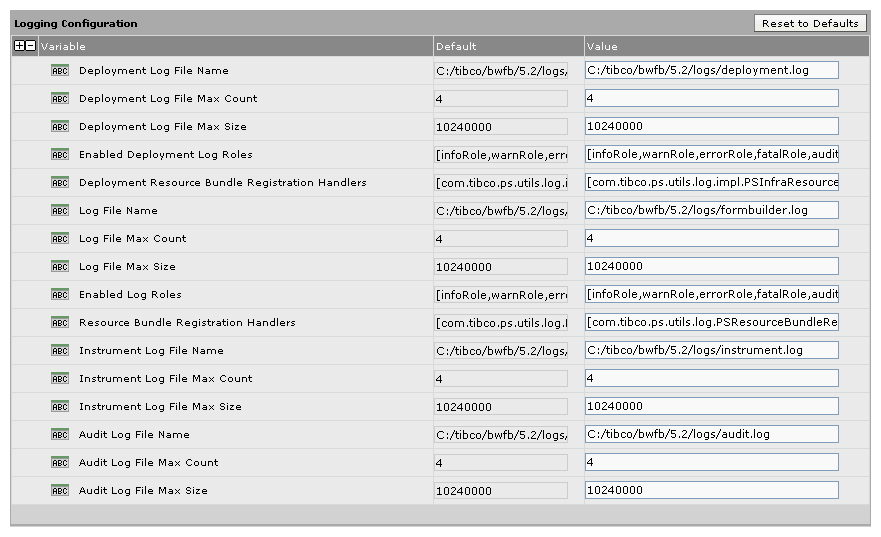
Before deploying an application, you need to make sure that the paths to the log files are correct. If the .ear file is built and deployed on the same machine, these paths are set correctly by default and there is no need to change them.
• The .ear file was built on one machine (and will be deployed on another machine. For example, TIBCO BusinessWorks FormBuilder is installed in the directory C:/tibco/bwfb_install_dir on the build machine, and in D:/tibco/bwfb_install_dir on the deployment machine.
• The .ear file was built on Windows and deployed on UNIX (or vice versa).
•
The default is install_dir/version/logs/deployment.log, or such as C:/tibco/bwfb_install_dir/version/logs/deployment.log on Windows The default number of log files is four, which means that any additional log file overwrites the current first file. You can configure which statements will be covered in the log file, such as infoRole, warnRole, errorRole, fatalRole, or auditRole. By editing this value, you can enable only the log roles you want to have covered in the log file, or to decide how much logging will be performed.For example, you can choose to log only fatal errors (fatalRole), or only the information that is used for audits (auditRole). The default is install_dir/version/logs/formbuilder.log, or such as C:/tibco/bwfb_install_dir/version/logs/formbuilder.log on Windows. The default number of log files is four, which means that any additional log file would override the current first file that was written. You can configure which statements will be covered in the log file, such as infoRole, warnRole, errorRole, fatalRole, and auditRole. By editing this value, you can enable only the log roles you want to have covered in the log file, or to decide how much logging will be performed.For example, you can choose to log only fatal errors (fatalRole), or only the information that is used for audits (auditRole).
•
• stdout Sink Enabled The default is instal_dir/version/logs/instrument.log, or such as C:/tibco/bwfb_install_dir/version/logs/instrument.log on Windows. The default number of log files is four, which means that any additional log file would override the current first file that was written. The default is install_dir/version/logs/audit.log, or such as C:/tibco/bwfb_install_dir/version/logs/audit.log on Windows. The default number of log files is four, which means that any additional log file would override the current first file that was written. Configure values in these sections, or click Reset to Defaults.
1. In the TIBCO Administrator console, select
Application Management> application_name> Configuration> application_name> AdvancedFigure 57 Logging Configuration.
|
| Copyright © Cloud Software Group, Inc. All Rights Reserved |