|
| Copyright © Cloud Software Group, Inc. All Rights Reserved |
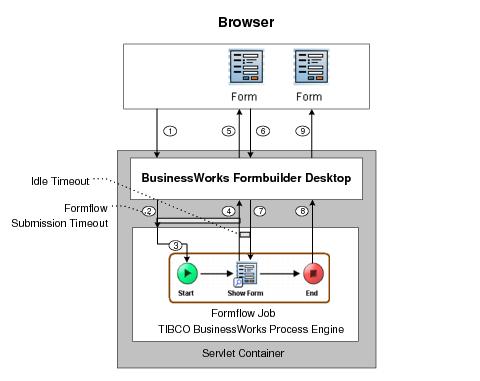
Formflows run in an embedded TIBCO BusinessWorks process engine, running in the same servlet container as FormBuilder Desktop. When the servlet engine is started, this engine is also started. Deployed formflows are part of the same web application as FormBuilder Desktop.FormBuilder Desktop has a form controller component that acts as an intermediary between the browser and the TIBCO BusinessWorks engine. Figure 31 illustrates each formflow processing step.Figure 31 Formflow Processing StepsUnlike automated processes, a formflow process instance is not explicitly created. Formflows run as a web application, and every formflow has a unique URL. A formflow process instance is created when a FormBuilder Desktop user accesses the URL.A formflow process instance can also be accessed outside the FormBuilder Desktop environment using the Get Formflow URL activity. This activity can be used to generate a URL that can be placed in a form or an email message. When an end user clicks the link, a formflow process instance is created.
1. When a user clicks a formflow URL, the FormBuilder Desktop controller component receives a request from the browser.
2. The controller component creates a process instance in the TIBCO BusinessWorks engine based on the deployed formflow process definition.At this point, FormBuilder Desktop waits for a configurable interval for a response from the TIBCO BusinessWorks engine. The response contains the form to render. This interval is specified during deployment, when the application is configured, by the Formflow Submission Timeout parameter.
4. The next activity in the formflow, the Show Form activity, is executed. This activity provides the controller component with the form state. For more information on form state, see Modifying Form Data in a Formflow.At this point, the Show Form activity notifies the formflow process instance to wait for a response from the browser, or for the HTTP session to time out. This interval is specified during deployment, when the application is configured, by the Idle Timeout parameter.In addition to the HTTP Session timeout, you can set a formflow timeout for the servlet engines as explained in Setting Formflow Timeouts for Servlet Engines.
5. The controller component renders the HTML form, and sends the form to the browser to be displayed.
6. In the browser, the user clicks a button associated with a form action. The browser sends the event to the controller component.
7. The controller component updates the form state and forwards it to the TIBCO BusinessWorks engine. The engine resumes the waiting formflow process instance, and the next formflow activity is executed.
8. When the formflow process instance executes the End activity, the TIBCO BusinessWorks engine notifies the controller component that processing is complete.
9. The controller component responds to the browser with a custom URL to complete the formflow, if specified, or a default URL.
|
| Copyright © Cloud Software Group, Inc. All Rights Reserved |