When a formflow process instance starts, a process variable is created for storing the form state. Default values specified in TIBCO Designer are assigned at this point. When the formflow process instance executes a Show Form activity, the associated form is displayed in FormBuilder Desktop. The Show Form activity does the following:
A Show Form activity writes to the process variable to modify form state. Form state is the form that is rendered, with any related process data. For example, a form can be configured with default values, then further modified by a FormBuilder Desktop user who enters values in form fields. Form state can also be modified in a formflow process, by configuring activities and mappings. For details, see
Modifying Form Data in a Formflow.
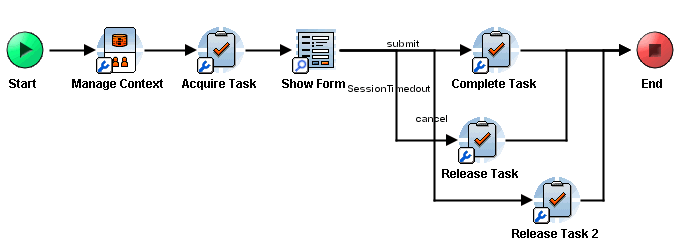
After a form is submitted, transitions from a Show Form activity determine the next activity that is executed. Transitions from a Show Form activity can be either standard TIBCO BusinessWorks transitions, or form-specific transitions. For descriptions of TIBCO BusinessWorks transitions, see the
TIBCO BusinessWorks Process Design Guide.
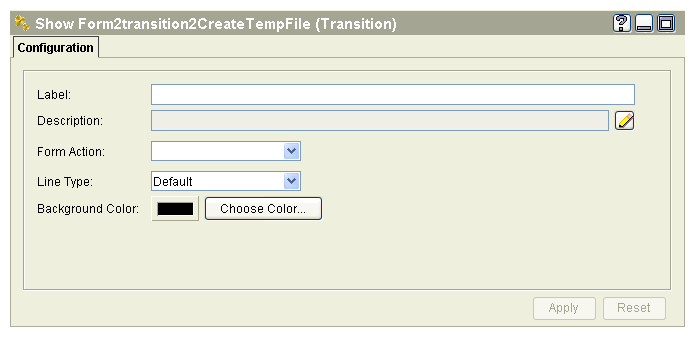
Form-specific transitions allow you to apply logic to user actions in a form. Actions are defined when the form is built in TIBCO Designer, and can be any user-specified string value, such as Submit or Cancel. When a user clicks a button associated with the submit action, for example, the formflow process instance takes the corresponding Submit transition.
Unlike in TIBCO BusinessWorks processes, all action transitions must be handled in the formflow. Each form action must have exactly one transition from the Show Form activity.
You can configure a transition to be taken for all non-error conditions. To create this type of transition, which is called the
default transition, leave the Form Action dropdown list blank.
Form-specific transitions can also be used for exception handling, such as when a validation error occurs. The set of error events are Validation Failed, Error, or Timed Out. These transitions are pre-defined, and cannot be modified.