Copyright © Cloud Software Group, Inc. All Rights Reserved


Chapter 6 Designing Formflows : Validating Formflows

Validating Formflows
Before testing or deploying formflows, it is important to check for configuration errors by validating formflow process definitions in TIBCO Designer. Formflows with missing or incorrect information will terminate without completing, both in the Tester utility and in the servlet engine after deployment.
It is recommended to identify and correct errors in TIBCO Designer before deploying the formflow application. The process of correcting errors in a deployed application is time-consuming. The application must be undeployed, any errors must be corrected in TIBCO Designer, the project must be validated and tested again, and the EAR file must be rebuilt before the application can be redeployed.
To Validate a Formflow Process Definition
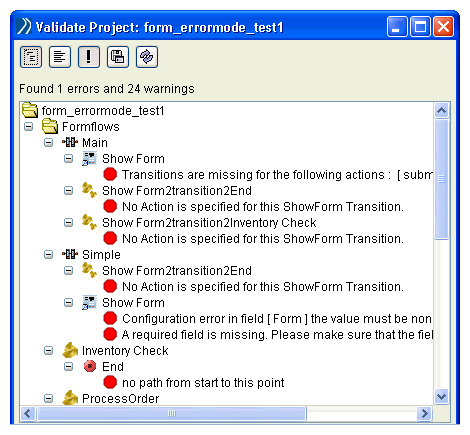
With the formflow resource selected in TIBCO Designer, select either Resource>Validate Resource, or Project>Validate for Deployment.
Figure 41 Validate Formflow Process Definition
A dialog displays with any configuration issues. Resolve any issues before proceeding. For descriptions of validation criteria for each resource, see the TIBCO BusinessWorks FormBuilder Palette Reference.

Copyright © Cloud Software Group, Inc. All Rights Reserved