|
| Copyright © Cloud Software Group, Inc. All Rights Reserved |
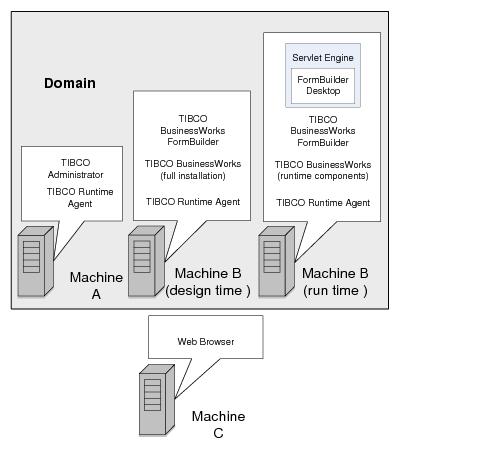
A TIBCO administration domain is a collection of users, machines, and TIBCO software components. The administration domain is monitored and managed by the TIBCO Administration Server in conjunction with a TIBCO Runtime Agent (TRA) that runs on each machine. Components in an administration domain can communicate with systems outside the domain, but the domain is the administrative boundary of the formflow project.Domain Utility, which is included in the TIBCO Runtime Agent package, is used to create and configure domains. After installing TIBCO Administrator, you can create and configure a new domain.
If no TIBCO administration domain for formflow applications exists, run Domain Utility and create a domain before proceeding. For instructions, see the TIBCO Runtime Agent Installation.If a TIBCO administration domain for formflow applications exists, before running Domain Utility make sure that the TIBCO Administrator Server and TIBCO Hawk™ Agent are both running.Adding components to a domain registers the components to that domain, which allows you to deploy BusinessWorks FormBuilder services in TIBCO Administrator. You can remove BusinessWorks FormBuilder components from a domain before adding this software to a different domain, or before uninstalling or upgrading it.
On UNIX, log in as the user that ran the installer program. On Windows, log in using an account with administrator privileges
• TIBCO Designer This application is used to build forms with the following resources and activities provided by TIBCO BusinessWorks FormBuilder.
− The Form Controls palette is used to add controls to a form. At runtime, controls become fields for user input.
− The Form Control Validators palette is used for adding validation criteria to a form control.
− The Formflow palette allows you to build formflows (sequences of forms created using the Form palette), along with related activities and processes.
− The FormBuilder palette allows you to create a FormBuilder Desktop, which is a Web-based application used to run FormFlows.
− The Portal palette allows you to build and customize a FormBuilder Desktop web application.
• TIBCO Administrator This is a web application and a central administration server. In TIBCO Administrator, you can specify configuration parameters and deploy formflow applications.
• FormBuilder Desktop This is web application run by a servlet engine that allows you to display forms and interact with formflows. It includes an embedded TIBCO BusinessWorks process engine for running formflows.
• Servlet engine A third-party servlet engine runs formflow applications and FormBuilder Desktop.TIBCO BusinessWorks FormBuilder components can be distributed across machines. When installing product components and required software, the following requirements must be met:
• TIBCO BusinessWorks must be installed on the same machine. A servlet engine is also required on this machine.
• TIBCO Administrator can be located on any machine in the domain and can run with no other TIBCO BusinessWorks FormBuilder components.In the diagram, machines A and B must belong to the same TIBCO administration domain. Machine C, which is running web browser software, can be outside the domain.
|
| Copyright © Cloud Software Group, Inc. All Rights Reserved |