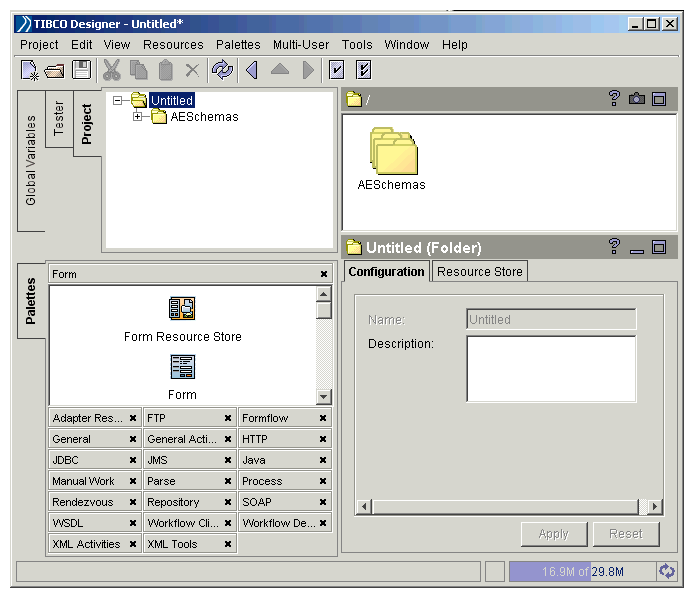
Palettes are enabled in TIBCO Designer only when they are appropriate for a resource or activity open in a project. The following sections describe the features of each palette.
The Form palette contains resources for defining the general look and feel of a form, such as the overall layout scheme. For example, a Form Resource Store can be used to add images, HTML files or other resources to the project.
Custom stylesheets can be referenced and applied to individual user interface elements. You can also use resources from this palette to define custom layouts and controls.
The Form Controls palette contains resources for all default user interface elements, such as text fields, buttons, and dropdown lists. To build forms, you drag and drop controls to a Form resource in TIBCO Designer. Default values can be specified, and run-time data can be mapped to form controls.
The Form Validators palette contains resources for validating data provided by end users. For example, for a numeric field, user-specified values can be verified as numeric and within a certain range. A field can also be defined as required. Depending on the type of field, different types of validator resources are available.
You can also use resources on this palette to apply validation criteria across multiple form fields. This type of validation can check for incompatible values between fields.
The Formflow palette contains resources for building formflow process definitions. Formflows are processes that display forms, collect and validate data, and process user input. You can combine form-specific resources on this palette with resources on all TIBCO BusinessWorks palettes to build a formflow. When the project is complete, the FormBuilder Archive resource allows you to package resources for deployment.
The TIBCO BusinessWorks FormBuilder palette contains resources that allow you to create a FormBuilder Desktop, which is a web application used to run formflows.

 Palettes are enabled in TIBCO Designer only when they are appropriate for a resource or activity open in a project. The following sections describe the features of each palette.The Form palette contains resources for defining the general look and feel of a form, such as the overall layout scheme. For example, a Form Resource Store can be used to add images, HTML files or other resources to the project.Custom stylesheets can be referenced and applied to individual user interface elements. You can also use resources from this palette to define custom layouts and controls.The Form Controls palette contains resources for all default user interface elements, such as text fields, buttons, and dropdown lists. To build forms, you drag and drop controls to a Form resource in TIBCO Designer. Default values can be specified, and run-time data can be mapped to form controls.The Form Validators palette contains resources for validating data provided by end users. For example, for a numeric field, user-specified values can be verified as numeric and within a certain range. A field can also be defined as required. Depending on the type of field, different types of validator resources are available.You can also use resources on this palette to apply validation criteria across multiple form fields. This type of validation can check for incompatible values between fields.The Formflow palette contains resources for building formflow process definitions. Formflows are processes that display forms, collect and validate data, and process user input. You can combine form-specific resources on this palette with resources on all TIBCO BusinessWorks palettes to build a formflow. When the project is complete, the FormBuilder Archive resource allows you to package resources for deployment.This palette provides resources for building and customizing the FormBuilder Desktop web application. Look and feel can be modified.The TIBCO BusinessWorks FormBuilder palette contains resources that allow you to create a FormBuilder Desktop, which is a web application used to run formflows.