Balance
All validation programs
This will validate mathematical operations on variables.
Format of Parameters
VarA Operand VarB = VarC IfFalseAction
Where:
VarA
|
A variable, |
Operand
|
One of these: - + * / |
VarB
|
A variable, |
| = | Equal sign. Put one space before and one space after the equal sign. |
VarC
|
A variable, |
(IfFalseAction)
|
Optional. Executed if the mathematical operation is FALSE. If omitted, a generic message is displayed. |
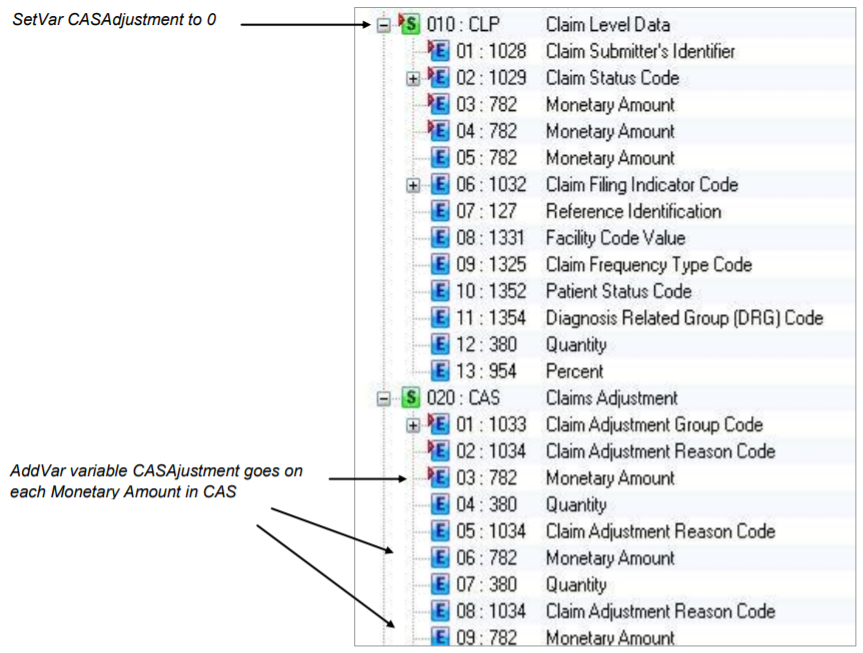
Example. This rule adds up adjustments and total paid amount to ensure that they equal submitted charges for each repetition of the CLP loop in an 835. If not, an error message displays.
-
Use SetVar to set the variables shown above.
-
Use the same AddVar name CASAdjustment on the CAS03, CAS06, CAS09, CAS12, CAS15, and CAS18. This sums all of the adjustments for a repetition of the loop.
-
On the CLP Segment (which begins the loop), set the CASAdjustment to 0. This starts the calculation at zero for each repetition of the loop:

-
To balance at the end of each repetition of the loop, go to the ST segment and use SetLoopPostInstanceExit and Balance functions:

This gives error message 32215 if the calculation is not true at the end of loop 2100, the CLP loop.

