DateCalc
All validation programs
DateCalc can be used in several ways:
Date Ranges:
-
Calculate how many days or months are in a date range and put the result in a variable.
-
Take action (such as displaying an error) based on the relationship between two dates.
Individual Dates:
-
Put the results of a calculation between two dates into a variable.
-
Display an error based on the calculation between two dates.
Example
|
Dates |
Number of days |
Number of months |
|---|---|---|
|
20070922-20071021 |
21 |
1 |
|
20070922 and 20050922 |
730 |
24 |
Date Ranges: Calculate how many days or months are in an RD8 date range
DateCalc can calculate how many days or months are between the two dates in a date range. This element would have a RD8 qualifier that contains a value like 20071028-20071204.
Format of Parameters
BYMONTH RD8 DateToCheck ResultVariable
Where:
| BYMONTH | Literal. The difference between the two dates is to be calculated in months. If omitted, the difference will be calculated in days. |
| RD8 | Literal. |
| DateToCheck | The location of the date range: a variable, literal in double quotes, |
| ResultVariable | A variable to hold the result of the calculation. |
Example 1 - number of days in a date range
This example calculates the number of days in the range contained in the current element and places the result in variable NumOfServiceDays.

Another rule might then check the value in NumOfServiceDays and take some action:

Example 2 - number of months in a date range
This example is the same as the previous, but it calculates the number of months in the range

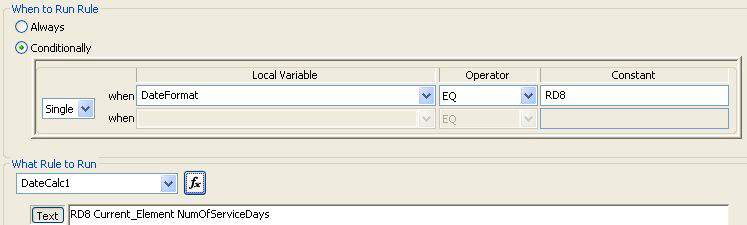
Example 3 - checking the qualifier first
Set a variable on the element Date Time Period Format Qualifier (in this example, we will use DateFormat).
It then checks the variable to see if it contains RD8. If so, it calculates the number of days in the range and places the result in variable NumOfServiceDays.
This example creates a 6-month date range on the fly. The FutureDate variable will contain the date 6 months from the Current_Date. It will be in D8 format. You can then use the FutureDate to create a date range and check a date against that range.

Date Ranges: Take action based on the relationship between two RD8 dates
DateCalc can take action based on the relationship between a date range and another number.
Format of Parameters
BYMONTH RD8 DateToCheck Operand IntegerVar (action if true)
Where:
| BYMONTH | The value is to be calculated in months. If omitted, the difference will be calculated in days. |
| RD8 | Literal. |
| DateToCheck | The location of the date range: a variable, literal in double quotes, Current_Date or Current_Element. |
| Operand | Any of these: EQ, NE, GT, LT, GE, LE |
| IntegerVar | A variable containing an integer, or a literal in double quotes (such as “5”). |
| (action if true) | Action to be taken if the calculation is true. |
Example. This displays an error message if the number of days in the current date range is less than the integer in the variable SV2Qty05.

If the rule is to be used with Analyzer, the DisplayErrorByNumber format is slightly different.
Individual Dates: Store the results of a calculation between dates in a variable
DateCalc can calculate how many days or months are between dates in two separate elements and put the result in a variable.
Format of Parameters
BYMONTH DateFormat1 Date1 - DateFormat2 Date2 ResultVariable
or
BYMONTH DateFormat1 Date1 ± Integer ResultVariable
Where:
| BYMONTH | The value is to be calculated in months. If omitted, the difference will be calculated in days. |
| DateFormat1 |
The format of the first date: If BYMONTH: D6, D8, or DT, or a variable containing one of these values. |
| Date1 |
The location of the first date: a variable, literal in double quotes,
|
| DateFormat2 | The format of the second date: D6, D8, or DT, or a variable containing one of these values. |
| Date2 | The location of the second date: a variable, literal in double quotes, Current_Date, or Current_Element. |
| ResultVariable | A variable to store the number of days between the two dates. |
±
|
A plus sign or a minus sign surrounded by spaces. |
| Integer | A literal in double quotes or a variable containing an integer. |
Example. This example calculates the number of days between the date in variable BHT04StatementDate and the date in the current element. The result goes into variable DelayInSubmitting.

Individual Dates: Display an error based on the calculation between two dates
DateCalc can calculate how many days are between dates in two separate elements and put the result in a variable.
Format of Parameters
BYMONTH DateFormat1 Date1 ± DateFormat2 Date2 Operand IntegerVar (action if true)
Where:
| BYMONTH | The value is to be calculated in months. If omitted, the difference will be calculated in days. |
| DateFormat1 | The format of the first date: D6, D8, or DT, or a variable containing one of these values. |
| Date1 | The location of the first date: a variable, literal in double quotes, Current_Date, or Current_Element. |
| ± | A plus sign or a minus sign surrounded by spaces. |
| DateFormat2 | The format of the second date: D6, D8, or DT, or a variable containing one of these values. |
| Date2 | The location of the second date: a variable, literal in double quotes, Current_Date, or Current_Element. |
| Operand | Any of these:EQ, NE, GT, LT, GE, LE |
| IntegerVar | A variable containing an integer, or a literal in double quotes (such as “5”). |
| (action if true) | Action to be taken if the calculation is true. |
Example. This example calculates the number of days between the date in variable BHT04StatementDate and the date in the current element. If the result is more than 365, display custom error message 32003.

If the rule is to be used with Analyzer, the DisplayErrorByNumber format is slightly different.
Complete Example
This set of rules in a HIPAA 837 will display an error if the transaction date and the date of service are more than 4 months apart.
First, capture the transaction date on the BHT04:

Go to the 2400 DTP03 for service date. In the first rule, capture the first 8 digits of the date:

In the second rule, capture the number of elapsed months:

In the third rule, display an error if the number of months is greater than 4:

Add or Subtract Hours and Adjust Date Accordingly
BYHOUR rules tell you how many days would have to be added or subtracted when you add or subtract hours from a time. It also reports the new time.
For example, if the data contained a time of 1800 and you added 10 hours, it would report that the time would be 0400, and one day would be added.
Format of Parameters
BYHOUR DateFormat1 Date1 HourChange DateFormat2 Date2 DaysAdded
Where:
| BYHOUR | Literal. Specifies that the difference between the two dates is to be calculated in hours. |
| DateFormat1 |
The format of the time, one of these: TSDD, DT, TSD, TM or TS. If unknown, use XX and validation will look at the value’s length to pick one of these formats: 8 TSDD = HHMMSSDD 12 DT = CCYYMMDDHHMM 7 TSD = HHMMSSD 4 TM = HHMM 6 TS = HHMMSS |
| Date1 | The original time: a variable, literal in double quotes, Current_Time, or Current_Element. |
| HourChange |
Hours to be added or subtracted - a variable or literal. Examples:
TimeChangeVar |
DateFormat2
|
This should be the same as DateFormat1. |
Date2
|
A variable to contain the new date and time, after the hours have been added to or subtracted from Date1. |
DaysAdded
|
A variable containing the number of days that would need to be added or subtracted to a date because of the time change. |
Example. This example calculates the date when 9 hours is added to the time in the GS05. If the new time runs into the next day, this information has to be captured in a variable in place of the date in the GS04.
GS*BE*901234572000*908887732000*20100926*1615*3466*X*004010X095A1~
-
Set a variable on the GS04 (a date):

This captures
20100926 -
Set up this rule on the GS05 (a time), which:
-
Adds 9 hours to the value in the GS05 and stores the result in variable NewGS05Var.
-
Determines that a time of 1615 + 9 hours = 2515. This means it is actually 0115 one day later. The 1 is stored in DayAddedVar.
DateTime.DateCalc:BYHOUR TM Current_Element 9 TSDD NewGS05Var DaysAddedVar
-
-
Calculate the new date with this rule, also on the GS05:
DateTime.DateCalc:BYDAY D8 GS04Var DaysAddedVar D8 NewGS04Var

Add Days to an existing Date
BYDAY rules add days to an existing date and put the result in a variable.
Format of Parameters
BYDAY DateFormat1 OriginalDate DaysAdded DateFormat2 NewDate
Where:
| BYDAY | Literal. The difference between the two dates is to be calculated in days. |
| DateFormat1 | D6, D8, or DT. |
| OriginalDate | Input date. A literal in double quotes, a variable, Current_Element, or Current_Date. |
DaysAdded
|
A literal in double quotes or a variable containing the number of days to add. If the value is negative, it will be subtracted from OriginalDate. |
DateFormat2
|
This should be the same as DateFormat1. |
NewDate
|
A variable to hold the new date. |
Example. See the DateTime.DateCalc:BYDAY