Variable Maps
Variables can be maps with alphanumeric indices. A map reference is a variable followed by an alphanumeric index in parentheses, like these examples:
|
VendorTypeTotals(“InState”) |
Refers to the “InState” slot of variable VendorTypeTotals. |
|---|---|
|
StateTotals(“OH”) |
Refers to the “OH” slot of variable StateTotals. |
|
CategoryFlag(1) |
Identical to CategoryFlag(“1”). |
|
IDNeeded(“”) |
Identical to IDNeeded (just a regular variable). |
|
IDNeeded(MyVar) |
Gets the index from the contents of variable MyVar. |
|
CountryTotals(%MyVar%) |
Gets the index from the contents of the variable contained in MyVar. See Preprocessor Variables on page Preprocessor Variables. |
|
BuyerIndex(MyVar(BuyerCode)) |
First uses BuyerCode’s contents as index into MyVar array, which it then uses as index into BuyerIndex array. |
BusinessRules.Variable.Clear will clear the entire map, and BusinessRules.Variable.DumpVars will display all map members, including their keys.
Maps are especially powerful when combined with preprocessor variables (see page Preprocessor Variables).
Example 1
We display a message if the sales tax rate is incorrect for the state.
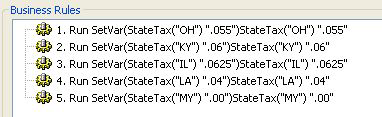
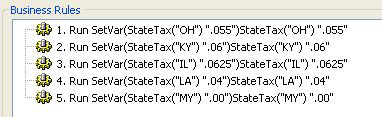
First, we create a map called StateTax containing sales tax rates for each state:
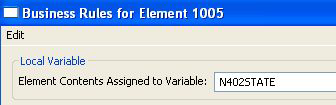
We set up a local variable on the State element:
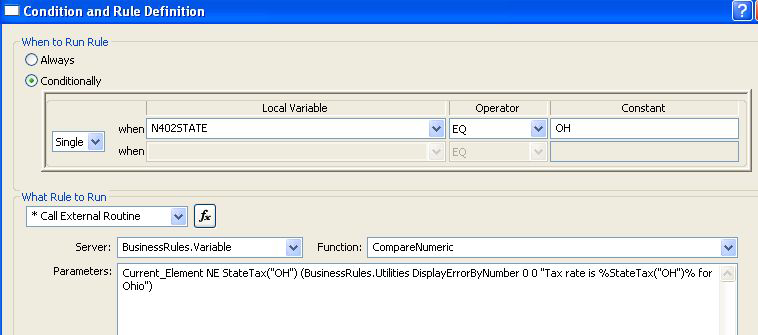
Next, we go to the tax rate element and use the “Single” row at the top to see if the state is OH. If so, we check the current element against our StateTax’s “OH” index. If they don’t match, we display a message like “Tax rate is .055 for Ohio.”
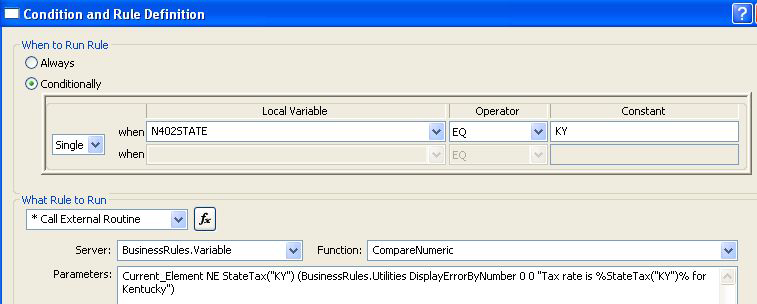
We repeat this for each state:
Example 2
Like Example 1, this displays a message if the sales tax rate is incorrect for the state, but it uses fewer rules.
First, we create the same map called StateTax containing sales tax rates for each state:
We set up a BusinessRule variable called StateCode on the State element:

Next, we go to the tax rate element and use the StateCode element as an index into our map. We put the tax rate they should be using, considering their state, into a variable called StateTaxRate:

In a second rule on the same element, we check the current element against what it should be (StateTaxRate). If it differs, we display a message that shows the correct state tax rate and the state:

This rule will take care of any state in our map. We do not need separate rules for each state.