Segment Context CTX
These are under your control. You can generate these or not, and can control which error numbers in the input data cause the CTX to appear in the 999.
For example, you might have a situational rule where this REF is required if the SBR02 contains 18:
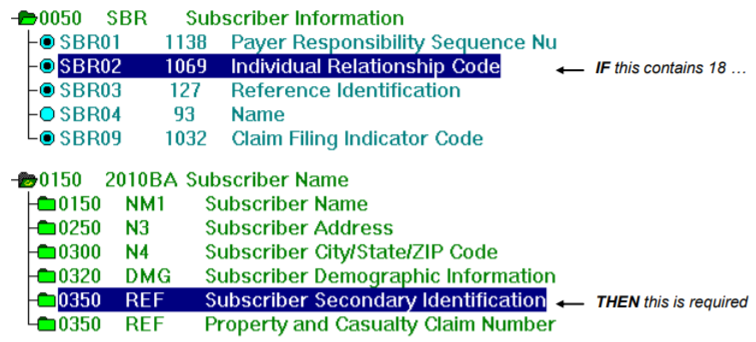
You could set up a typical business rule to display an error message on the REF segment during validation if this relationship is not honored. This gives you information about the REF not being there when needed.
If you also wanted information about the SBR02, the “if” part of the relationship, then you could use a CTX segment in the 999 created by Response Generator.
You have these options for Segment Context CTX in a 999 created by Response Generator:
-
No CTX segments
-
TIBCO Foresight-Created CTX segments
-
Your own custom CTX segments
No Segment Context CTX Segments
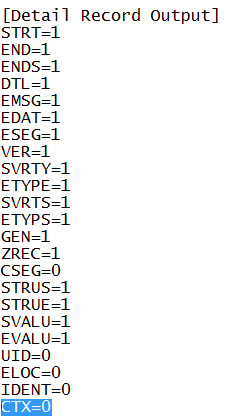
To generate no Segment Context CTX segments at all, be sure the validation APF file contains CTX=0:
TIBCO Foresight-Created Segment Context CTX Segments
Setup
To generate the TIBCO Foresight-defined CTX segments:
-
Set CTX=1 in the APF that you are using.
-
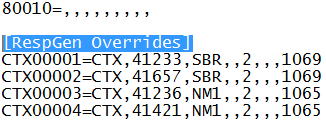
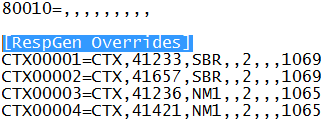
Be sure that your APF contains a [RespGen Overrides] section like this:
-
Use a 5010 Errata PDSA guideline that includes the CTX rules, or a guideline that is merged with one. These are listed in ForesightHIPAAguidelinelist.pdf.
-
On the Response Generator command line, use the -apf parameter and include the entire path to the APF, like this:
"C:\Foresight\Instream\Bin\respgen.exe"
-i "C:\Foresight\Instream\output\837Ifile_results.txt"
-o999 "C:\Foresight\Instream\Output\837Ifile_999.txt" -ge
-apf "C:\profiles\my.apf"
Results
-
The validation detail file will contain CTX records like this if the situational rule is violated:
CTX 18|CTX02|14,32001
TIB_fsp-instream_<n.n>_usersguide.pdf describes the format of the CTX record.
-
The 999 will contain CTX segments like this if the situational rule is violated:
CTX*SITUATIONAL TRIGGER*SBR*14**2*1069~
Example
If the situational rule is:
If the SBR02 contains 18, the N3 segment is required.
… then the violation of the rule will be discovered at the position where the N3 should have been (the THEN part of the relationship).
The CTX segment is saying that the IF part of the relationship was on the SBR segment at position 14 in the EDI data, the element is at position 2 in the SBR, and its element ID is1069.
Your own Custom Segment Context CTX Segments
Setup
To generate your own Segment Context CTX segment:
-
In the APF’s [Detail Record Output] section, set CTX=1.
-
In the APF’s [RespGen Overrides] section, add your own line for each CTX segment you intend to generate. See CTX Lines in the APF.
-
To specify the contents of the IK304 or IK403 for the error number being used for this situational rule, do so in the APF’s [Warning Levels] section. Find the line that corresponds to the error message and type the value that you want to use in the appropriate slot. See TIB_fsp-instream_n.n.n_APF.pdf for details.
Example
Your situational rule uses error number 32001 and should generate a 3 in the IK304, like this:
IK3*REF*16*2010*3~
In the APF, add the 3 here:

-
Create a guideline that generates these CTX records in the validation detail file. See Creating a Guideline that makes Segment Context CTX Records.
-
Merge with a 5010 Errata PDSA guideline that includes the CTX rule. These are listed in ForesightHIPAAguidelinelist.pdf.
-
Validate with the merged guideline.
-
On the Response Generator command line, use the -apf parameter and include the entire path to the APF, like this:
"C:\Foresight\Instream\Bin\respgen.exe"
-i "C:\Foresight\Instream\output\837Ifile_results.txt"
-o999 "C:\Foresight\Instream\Output\837Ifile_999.txt" -ge
-apf "C:\profiles\my.apf"

Results
The 999 will contain your customized CTX segment with the same structure as the ones created by TIBCO Foresight rules.
CTX Lines in the APF
The format of the CTX line in the APF corresponds closely to the structure of the 999 Segment Context CTX segment, which is:
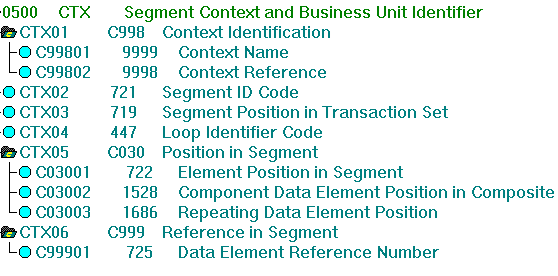
The format in the APF is:
number=CTX,errorNum,segID,loopID,posInSeg,PosinComp,Repeat,elemID
Where:
number=CTX
|
A unique number that starts with “CTX” followed by five digits followed by “=CTX”. The number must be unique. Recommendation: Start with CTX50001 to avoid having your number overwritten by a new default TIBCO Foresight CTX number. |
errorNum
|
This error’s number in your custom errors file. |
segID
|
ID of the first segment in the situational relationship. |
loopID
|
LX loop ID. Only include this if the 999 CTX segment requires it. |
posInSeg
|
In the first segment of the situational relationship, the position of the element or composite involved in the error. Omit if the error concerns the segment as a whole. |
posInComp
|
In the first segment of the situational relationship, the position of the element within the composite. Omit if the element is not in a composite. |
Repeat
|
In the first segment of the situational relationship, the number of the instance if this is a repeating element. |
elemID
|
In the first segment of the situational relationship, the ID of the element, if any, containing the error. |
To see the structure of the 999, see one of the 5010 Errata 999 guidelines listed in ForesightHIPAAguidelinesList.pdf.
Example 1
The first segment in the situational relationship is the SBR, and the situational rule involves the SBR02:
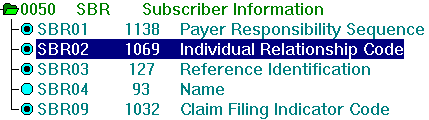
Example CTX entry in APF file:
CTX50001=CTX,32001,SBR,,2,,,1069
Where:
CTX50001
|
A unique number. |
=CTX
|
Literal text. |
32001
|
The error number is 32001 in the customer errors file. |
| SBR | The first segment in the situational relationship is the SBR. |
,,
|
No LX loop ID. |
2
|
The error involves the SBR-02. |
,,
|
There is no subelement involved in the situational relationship. |
,, |
There is no element repeat involved in the situational relationship. |
1069
|
The error involves the element with ID 1069. |
Example 2
The first segment in the situational relationship is the TRN, and the situational rule involves the entire segment:
CTX50002=CTX,32002,TRN,,,,,
Example 3
The first segment in the situational relationship is the CLM and the situational rule involves the CLM-05 (a composite), subelement 1.
CTX50003=CTX,41079,CLM,,5,1,,
Creating a Guideline that makes Segment Context CTX Records
See BusinessRules.pdf for details on these rules, which are typically used to create Segment Context CTX records:
-
SaveCurrentSegment
-
GetValueFromSegment
-
BuildString
-
OutputCTX
This section demonstrates these rules with this example:
IF the SBR02=18
THEN the 2010BA REF for Subscriber Secondary Identification must be used
We want two results if this is violated:
-
A validation error message
-
A CTX record in Response Generator’s 999
Strategy for Creating Segment Context CTX Rules
Files for this example are in TIBCO Foresight® Instream®’s DemoData\CTX directory.
Set up the IF part:
-
On the first segment in the situational relationship, use SaveCurrentSegment to capture the entire segment in a variable. Example
On the SBR segment, save the SBR and clear a variable that will contain the contents of the SBR02:
BusinessRules.Variable. SaveCurrentSegment 2000BSBRSeg BusinessRules.Variable Clear SBR02Var -
If there is a value in the first segment that is involved in the situational relationship, capture it in a variable.
Example
On the SBR02, capture its contents in a variable:
BusinessRules.Variable SetVar SBR02Var
Set up the THEN part:
-
Set up a test to see if the condition has been met and display a validation error message if needed.
Example
On the REF segment, if the segment doesn’t exist, test the contents of the SBR02. If it contains 18, display a custom error message.
BusinessRules.Run RunNoData (BusinessRules.Variable CompareString SBR02Var EQ "18" (BusinessRules.Utilities DisplayErrorByNumber 32001)) -
Create the rules needed to put a CTX record in the validation detail results file.
Example
On the REF segment, if the segment doesn’t exist, test the contents of the SBR02. If it contains 18, put the entire SBR segment into a variable.
We already have the SBR segment in 2000BSBRSeg. We just need to get it from there into an ordinary variable, which we are calling SEGPOS2000BSBRSeg.
BusinessRules.Run RunNoData (BusinessRules.Variable CompareString SBR02Var EQ "18" (BusinessRules.Variable GetValueFromSegment 2000BSBRSeg POS -1 -1 SEGPOS2000BSBRSeg))We use this rule to build the CTX record for the validation detail file:
BusinessRules.Run RunNoData (BusinessRules.Variable CompareString SBR02Var EQ "18" (BusinessRules.Utilities BuildString CTXOUTSTRING "" "CTX02" "|" SEGPOS2000BSBRSeg "," "32001"))And, finally, we output the CTX record:
BusinessRules.Run RunNoData (BusinessRules.Variable CompareString SBR02Var EQ "18" (BusinessRules.Utilities OutputCTX CTXOUTSTRING)) -
Now merge it with a PDSA guideline and use the merged guideline for Instream® validation and Response Generator.