Transaction Sets
Response Generator determines its response based upon its analysis of the Instream detail file’s DTL and GEN records. Each Instream message has a severity level:
0 = Ignore
1 = Informational
2 = Warning
3 = Error
4 = Fatal Error
5 = User Error #1
6 = User Error #2
Response Generator has an Error Limit and a Warning Limit, which is set to one of these severities. These determine if a validation message should result in the rejection of a transaction set, an acceptance of the transaction set with errors, or a full acceptance of the transaction set.
Error Limit
The Error Limit is a number from 0 through 6 correspondings to a severity level. Errors at or above that setting cause rejection of the transaction set.
Example: With an Error Limit of 3, any error with a severity of 3, 4, 5, or 6 will cause rejection of the transaction set.
If validation found an error with a severity equal to or greater than the Error Limit, then Response Generator rejects the transaction set and generates the appropriate 997 AK3/AK4, 999 IK3/IK4, and/or 824 OTI/TED segments.
At the end of the transaction set processing, the Response Generator will generate a 997 AK5-01 with an Acknowledgment Code of R for Rejected, a 999 IK5-01 of R, and/or an 824 OTI Application Acknowledgment Code of TR for Transaction Set Reject.
The default Error Limit is 3 (Error), but this can be overridden with the -er command-line option, or the SetRejectSeverity() API function
Warning Limit
The Warning Limit is also a number from 0 through 6 correspondings to a severity level. It determines what happens to the severities not covered by the Error Limits. It should always be less than or equal to the Error Limit.
If validation found a severity equal to or greater than the Warning Limit, but less than the Error Limit, then Response flags the transaction set as Accepted with Errors.
This causes a warning flag to be set for the transaction set and generation of the appropriate 824 OTI/TED segments.
At the end of the transaction set processing, if the transaction set did not contain an error, Response Generator will generate an AK5-01 or IK5-01 with an Acknowledgement Code of E for Accepted But Errors Were Noted, and/or an 824 OTI Application Acknowledgement Code of TE for Transaction Set Accept with Error.
The default Warning Limit is 2 (Warning), but it can be overridden with the -ew command-line option, or the SetWarningSeverity() API function.
How Warning Limits and Error Limits Work Together – Example
If you run Response Generator with a Warning Limit of 2 and an Error Limit of 4:
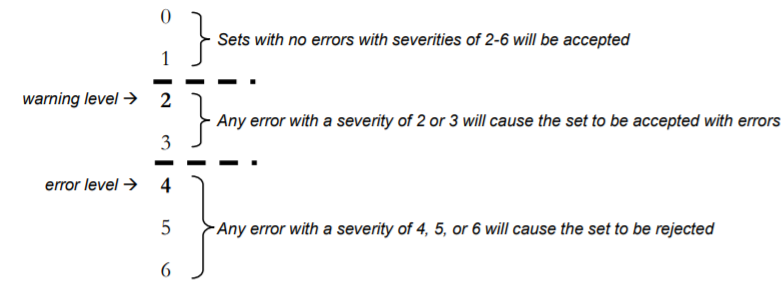
|
|
|
These severities cause Rejection |
These severities cause Acceptance with Error |
|---|---|---|---|
|
4 |
2 |
4, 5, 6 |
2, 3 |
|
3 |
2 |
3, 4, 5, 6 |
2 |
|
3 |
3 |
3, 4, 5, 6 |
none |
-pt Parameter
A transaction set can be accepted with errors if you used Response Generator’s -pt parameter. You can then run the EDI through Docsplitter and process the valid claims.
If you use the -pt parameter, you will probably need to communicate which claims are not getting paid by generating a 277 with the -o277 parameter.