Warning Levels Section
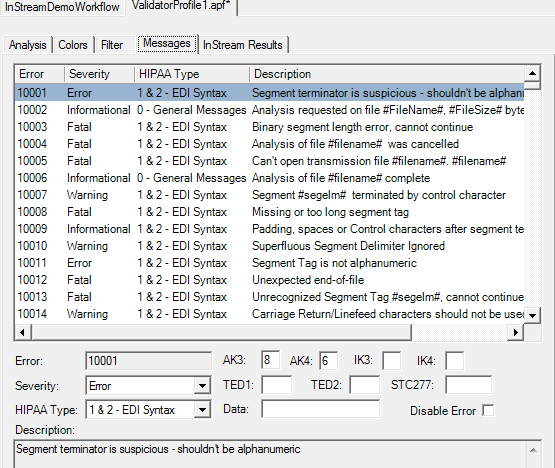
The [Warning Levels] section of the APF file corresponds to HIPAA Validator Desktop’s Options > Validator Profile > Messages tab.
HIPAA Validator Desktop

APF File Example:
[Warning Levels]
10001=3,1,8,6,,,,,,
10002=1,0,,,,,,,,
10003=4,1,8,,848,,,,,
.
.
.
35314=3,4,8,,011,,148,,,
35315=3,4,8,,011,,128,,,
.
.
Foresight Studio
|
In APF File (Default Settings Shown) |
In HIPAA Validator Desktop and Foresight Studio Profile Boxes |
Result |
|---|---|---|
|
[Warning Levels]
|
|
This section describes the characteristics of each diagnostic message as displayed in HIPAA Validator Desktop’s top pane and in Instream’s detail results file. Some fields supply values that are used by Response Generator when it creates 997s, 999s, and 824s. |
|
List of error and warnings messages.
|
These fields: Error, Severity, HIPAA TYPE, AK3, AK4, TED1, TED2, STC-01-02, IK304, IK403, Application Data See Format of Warning Levels Lines information section for format. |
|
Format of Warning Levels Lines
errornumber=severity,type,AK3,AK4,TED1,TED2,STC-01-02, IK3,IK4,data
Where:
| errornumber |
Each error has a unique ID number. Their ranges are shown in TIB_fsp-instream_n.n.n_ErrorMessageNumbers.pdf. Please see TIB_fsp-instream_n.n.n_ErrorMessageNumbers.pdf for a chart of where each error message is located. Commas separate each field. Always include all of the commas. |
||||||||||||||||
| , | Commas separate each field. Always include all of the commas. | ||||||||||||||||
| severity |
The severity of this error, a number from 0 to 6:
Putting a minus sign in front of an individual error’s severity (right after the equals sign) causes the error to be omitted from the validation detail file: 79972=-3,8,8,7,024,X1,, |
The effects of changing a message’s severity include:
-
Colors: HIPAA Validator Desktop displays the message in a different color.
-
Validation: The change will affect what HIPAA Validator Desktop or Instream flags as an error.
-
Filtering: HIPAA Validator Desktop or Instream filters according to the severity level.
-
DocSplitter sends data to the invalid file if it generates messages with severities of 3-6.
-
Response Generator uses severity to determine its response. By default, it:
-
Ignores messages with severity levels 0 and 1
-
Treats messages with severity 2 as warnings, but still accepts the data
-
Treats messages with severity 3 or higher as error and issues a rejection
-
| type |
The error type, a number from 0 to 8. HIPAA Validator Desktop shows a P next to its checkbox for Partner-specific errors, while Instream uses 8 to represent Partner-specific errors.
The effects of changing a message’s type include:
|
||||||||||||||||||||||||||||||
| AK3 |
Affects Response Generator 997s and 999s only. This value appears in the Instream DTL record and is used by Response Generator to populate the contents of the AK304 element. For valid values, see the X12 code list for AK304. If the APF file includes no value for the AK3, and therefore the validation DTL record contains no value for it, Response Generator will use these default values in the AK3:
|
||||||||||||||||||||||||||||||
| AK4 |
Affects Response Generator 997s and 999s only. This value appears in Instream’s DTL record and is used by Response Generator to populate the contents of the AK403 element. For valid values, see the X12 code list for AK403. If the APF file includes no value for AK4, and therefore the validation DTL record contains no value for it, Response Generator will use a default value of 7. |
||||||||||||||||||||||||||||||
| TED1 |
Affects Response Generator 824s only. This value appears in Instream’s DTL record and is used by Response Generator to populate the contents of the TED01 element in an 824. For valid values, see the X12 code list for TED01. If a TED02 is to be included, then the TED01 should contain code value 024. If the APF file includes no value for TED1, and therefore the validation DTL record contains no value for it, Response Generator will use a default value of 024. |
||||||||||||||||||||||||||||||
| TED2 |
Affects Response Generator 824s only. This value appears in Instream’s DTL record and is used by Response Generator to prefix the contents of the TED02 element in an 824. For HIPAA transactions, see the HIPAA 824 code list for valid values. If the APF file includes no value for TED2, and therefore the validation DTL record contains no value for it, Response Generator will not include a value for the TED02. |
||||||||||||||||||||||||||||||
| STC-01-02 |
Affects Response Generator only. (This cannot be set in the HIPAA Validator Desktop Profile dialog box. You must edit the APF file directly to put in STC-01-02 overrides.) When creating an unsolicited 277, the first error in each claim will generate a STC segment. You can put in a value here for the STC-01-02 for this particular error number. If omitted, the STC-01-02 will contain 21. Assume a claim has 3 errors:
The value in the STC-01-02 generated by Response Generator will be 24, which is the first user-specified value. If none of the three errors had STC-01-02 values specified in the APF, the STC-01-02 would be 21. We recommend that you NOT specify 21 in the APF. It is already the default, and inserting it might interfere with Response Generator’s ability to use another value that you specified. |
||||||||||||||||||||||||||||||
| IK3 |
Affects Response Generator only. This value appears in the Instream DTL record and is used by Response Generator to populate the contents of the IK304 in a 999. See the IK304 code value list for valid values. If the APF file includes no value for IK304, and therefore the validation DTL record contains no value for it, Response Generator will use these default values in the 999’s IK304:
|
||||||||||||||||||||||||||||||
| IK4 |
Affects Response Generator only. This value appears in Instream’s DTL record and is used by Response Generator to populate the contents of the IK403 element in a 999. See the IK403 code value list for valid values. If the APF file includes no value for AK403, and therefore the validation DTL record contains no value for it, Response Generator will use a default value of 7. |
||||||||||||||||||||||||||||||
| data | This value appears at the end of Instream’s DTL record and is for your own use. Example use: Display your own internal error number for use by one of your application programs. |
Example 1
10001=3,1,8,6,,,,,,
This line describes error number 10001, which is in the range for built-in messages triggered by basic X12 rules. The rest of the line describes error 10001:
-
Severity is 3, indicating an error.
-
HIPAA type is 1, indicating EDI syntax error.
-
AK3 is 8. The AK304 contains 8, which means “Segment has Data Element Errors.”
-
AK4 is 6. The AK403 contains 6, which means “Invalid Character in Data Element.”
-
The trailing commas are placeholders for TED1, TED2, STC-01-02, IK3-04, IK4-03 and data, which are empty.
Example 2
38117=3,6,8,10,012,,,,,L42
This line describes error number 38117, which is in the range for messages triggered by HIPAA rules. The rest of the line describes error 38117:
-
Severity is 3, indicating an error.
-
Type is 6, indicating the message pertains to Product Types or Lines of Service.
-
AK3 is 8. The AK304 contains 8, which means “Segment has Data Element Errors.”
-
AK4 is 10. The AK403 contains 10, which means “Exclusion Condition Violated.”
-
TED1 is 012. The TED101 contains 012, which means “Invalid Combination.”
-
The commas are placeholders for TED2, IK3-04, IK4-03 and STC-01-02.
-
Data is L42 and is for your company’s use. TIBCO Foresight does not use it.
Example Warning Levels Tab in HIPAA Validator Desktop

APF File
