Swapping Scenarios
Scenario 1
Replacement value is already known when the value to be replaced is encountered
In this case, the value to be swapped in is either a literal or a variable that has already been set.
For example, the location for the swap is at in the diagram below, and the value to be swapped in is set in a variable at . When the change has to be made, the replacement value is already known.
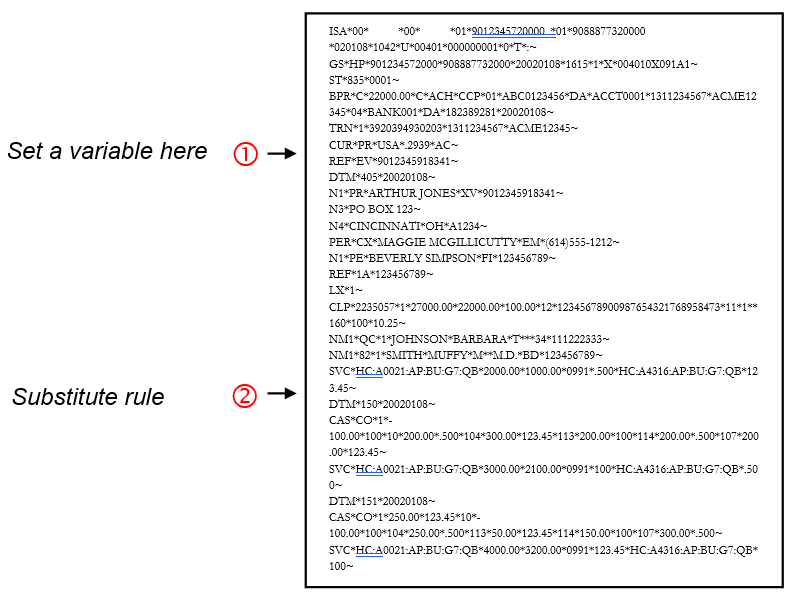
To do this:
Put a SetVar rule (or another rule that puts a value into a variable) here.
Put a Substitute rule on location for the swap.
Scenario 2
Replacement value is not known when the value to be replaced is encountered
In this case, the replacement value has not been set when the value to be replaced is reached:
For example, the value to be replaced is at in the diagram below, but the value that replaces it is set at
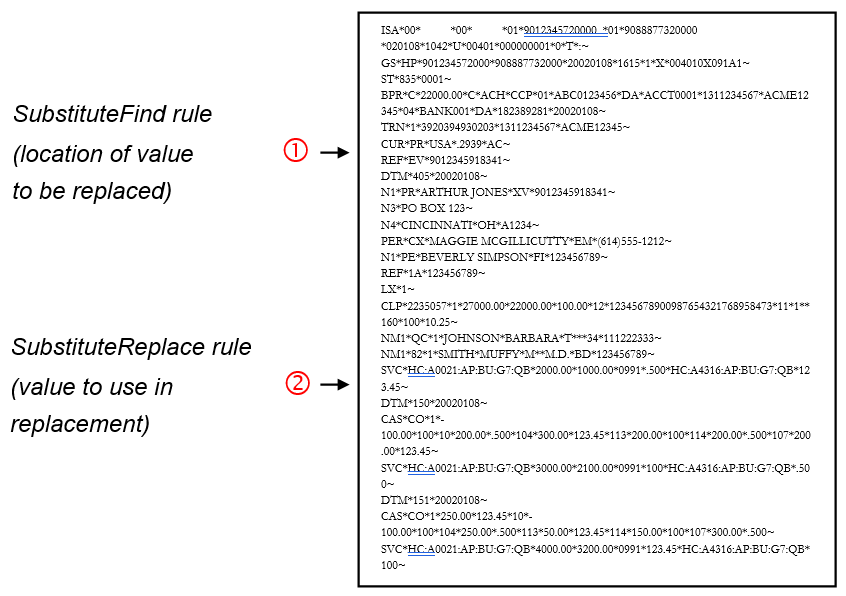
In this scenario, you will assign the find-replace pairs a “key” to link them together. This clears up ambiguities in case the file has repeating loops and therefore multiple find-replace pairs.
To do this:
-
Put a SubstituteFind rule on the element containing the value to be replaced. A guideline can have multiple SubstituteFind rules with the same key.
-
Set up a SubstituteReplace rule to define what value is used to replace the found value. This can be anywhere in the file. If the guideline has multiple SubstituteReplace rules, be sure that they have unique keys. Otherwise, only the last one will be used. Also, if the SubstituteReplace uses a variable, be sure that it is set before the SubstituteReplace rule executes.
There is no point in using more than one SubstituteReplace with the same key. Since Dataswapper makes two passes through the file for Scenario 2, it the last SubstituteReplace that is used in all locations.
-
The key acts as the binder between a find-replace pair.