Creating a Guideline from a COBOL Copybook
Requires EDISIM 6.6 or later.
Copybook File Format
EDISIM will support most COBOL keywords except:
-
VALUE OF system-name IS <data-name literal>
-
DATA RECORDS ARE data-name …
-
LINAGE IS remainder of clause
-
RECORDING MODE IS mode
-
CODE-SET IS alphabet-name
-
LABEL RECORD IS data-name
-
RENAMES <data-name> <remainder of clause>
-
ASCENDING/DESCENDING KEY IS name INDEXED BY name
-
USAGE IS <INDEX POINTER COMP-1 COMP-2 DISPLAY-1>
-
OCCURS VARYING
These OCCURS clauses will just import the upper limit as the repeat count, since we currently support only a maximum repeat count:
OCCURS n TO n TIMES
OCCURS integer-1 TO integer-2 TIMES DEPENDING ON remainder of clause
Importing the Copybook
When importing a COBOL copybook, Standards Editor automatically translates 'soft hyphen' characters (hex AD) into regular hyphen characters (hex 2D).
To import a COBOL copybook into Standards Editor for use as a delimited or fixed-length-field guideline:
-
Open Standards Editor.
-
Choose File > Import > Import COBOL Copybook and open.
-
Select the copybook.
There is a sample Address.cob in EDISIM’s Samples directory.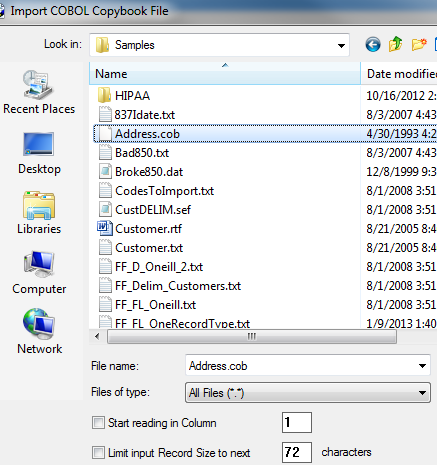
Additional Checkbox Options:
Start reading in column”:
This option allows you to specify a record start position. COBOL copybooks sometimes have an internal identifier or counter at the start and/or end of each line. This option allows you exclude those areas from the import. For example, your copybook has a record ID in the first six positions of each copybook record. You might check this box and specify that the import start with column 7. Default is column 1.
Limit Input Record Size to next…”:
This option allows you to limit record size to a certain number of characters. Default is 72 characters.

-
Have a look at the guideline:
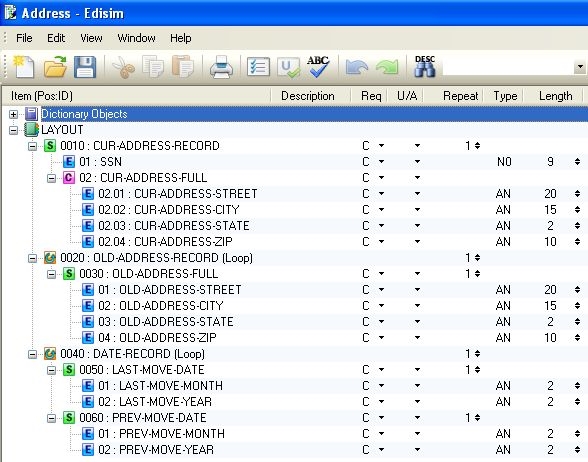
-
Choose File > Properties > User-Defined Standard and fill out the information as described in Splitting Flat Files with Document Splitter on page Splitting Flat Files with Document Splitter.
