HL7 Specific Information
Users who are familiar with EDISIM, Instream, HIPAA Validator Desktop, and Foresight Translator from working with X12 EDI will find the following differences when working with the HL7 standard.
Terminology
General terminology differences between X12 data and HL7 data are as follows:
|
X12 |
HL7 |
|---|---|
|
Interchange |
File |
|
Functional Group |
Batch |
|
Transaction Set |
Message |
|
Loop |
Segment Group |
|
Segment |
Segment |
|
Sub-Composite Members |
Field Sub-Components |
|
Element |
Fields |
|
Code Set |
Table |
Requirements Coding
The following Requirements characters are used in the Requirements field in HL7 messages:
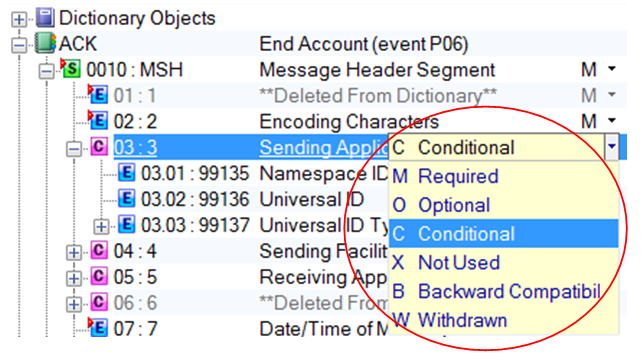
|
Character |
X12 Meaning |
HL7 Meaning |
|---|---|---|
|
M |
Mandatory |
Required |
|
O |
Optional |
Optional |
|
C |
Conditional |
Conditional |
|
X |
(none) |
Not Used |
|
B |
(none) |
Backward Compatibility |
|
W |
(none) |
Withdrawn |
Sub-Composites
Composites in HL7 transactions may contain sub-composites.

Codes
There will be a new Responsible Agency Code of ‘H’ in the fourth field if the .INI record to identify HL7 standards.
Enveloping
Enveloping differences between X12 data and HL7 data are as follows:
|
The HL7 segment… |
Defined as… |
Is like this segment in X12… |
|---|---|---|
|
FSH |
File Header Segment |
ISA (optional) |
|
BSH |
Batch Header Segment |
GS (optional) |
|
MSH |
Message Header Segment |
ST |
|
(none) |
Message Trailer Segment |
SE |
|
BST |
Batch Trailer Segment |
GE (optional, but required if BSH is used) |
|
FST |
File Trailer Segment |
IEA (optional, but required if FSH is used) |
HL7 Identifier in Validation Detail File
GEN record 17021 within the validation detail file indicates the data is HL7. The “1” in front of the GEN record number is the line number in the data file.