Creating an Instream Validation Profile
You can set up your own profiles from within Foresight Studio:
-
Click the system where the new validation profile will be used.
-
Choose File > New > Validator Profile.
-
In the left pane, type a name for the profile. Use file extension apf.
The work area will display a tab for the new profile. Each profile has its own tabs for Analysis, Colors, Filter, Messages, and InStream Results.
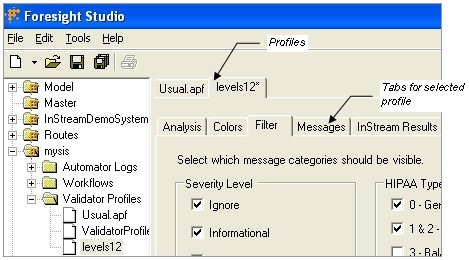
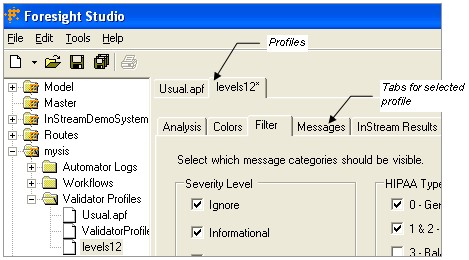
Analysis Tab
The Analysis tab contains basic validation options.
The options are explained in detail in the Analyzer Options Section of TIB_fsp-instream_n.n.n_APF.pdf.
Colors Tab
The Colors tab specifies which colors are used to display each error type.
Since Instream output does not use color, this tab affects Foresight® HIPAA Validator® Desktop only. Although Foresight HIPAA Validator Desktop cannot be part of a Foresight Studio workflow, you can customize colors from within Foresight Studio and use the resulting profile in Foresight HIPAA Validator Desktop.
|
Using the Colors Tab |
|
|---|---|
|
To do this … |
Do this … |
|
Change colors for a particular type |
Click the color next to the type. |
|
Reset colors to the default |
Click Default Colors. |
|
Set all colors to black |
Click No Colors. |
Default Colors for Diagnostic Types
|
Type |
Color |
Meaning |
|---|---|---|
|
Ignore |
Light gray |
Messages you consider unimportant. |
|
Informational |
Dark gray |
Identifies segments, cancellations, etc. |
|
Warning |
Olive |
Minor errors, such as leading zeros in numerics or assumptions made due to ambiguity. |
|
Error |
Blue |
Errors such as wrong codes, violation of rules, etc. |
|
Fatal |
Red |
Error that stops the validation from continuing. |
|
User #1 |
Dark green |
For your use. |
|
User #2 |
Light green |
For your use. |
Filters Tab
Each message has a severity and a HIPAA type. This tab lets you designate the severities or types of validation messages that you want to display.
The options are explained in detail in the Warning Allow and Types Allow sections of TIB_fsp-instream_n.n.n_APF.pdf.
Messages Tab
This tab describes the characteristics of individual validation diagnostic messages.
You can change the severity, HIPAA type, and other characteristics of the message.
The options are explained in detail in the Warning Levels Section of TIB_fsp-instream_n.n.n_APF.pdf.
InStream Results Tab
This tab lets you select which records will appear in Instream’s detail results file.
The options are explained in detail in the Detail Record Output Section of TIB_fsp-instream_n.n.n_APF.pdf.