Task Tab
This tab defines what the component does when it activates.
Each component contains one or more tasks. This ResponseGen component has four tasks, plus the ComponentEnd marker.
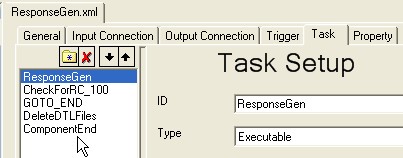
When you click a task, the rest of the Task tab updates to show information about it.
When the component activates, its tasks execute sequentially.
To set up a new task:
-
Click the
 button if the fields are not available.
-
Fill out the fields as described in the table below.
-
Save.
-
Repeat for the other tasks in the component.
Fields on the Task tab

|
Type |
Description |
|---|---|
|
ID |
Required. Type the name for the set of tasks. Parameter: The task name shows up in the task list:
|
|
Type |
Executable Run an executable, batch file, or command prompt. Parameters:
|
|
|
Copy Copy a file or files from one directory to another. Note: This will overwrite any files with the same name in the target directory.
You can include variables surrounded by %, as described in Variables_for_Workflows.pdf. Any existing tracking files are copied as well, before their source file is copied. Parameters:
|

|
Type |
Description |
|---|---|
|
|
Move Move a file or files from one directory to another. Note: This will overwrite any files with the same name in the target directory.
You can include variables surrounded by %, as described in Variables_for_Workflows.pdf. Any existing tracking files are moved as well, before their source file is copied. Parameters: The parameters are the same as for Copy. |
|
Clean Delete all zero-byte files in the specified directory. Parameter: 1 The only parameter line is the directory. Examples:
|
|
|
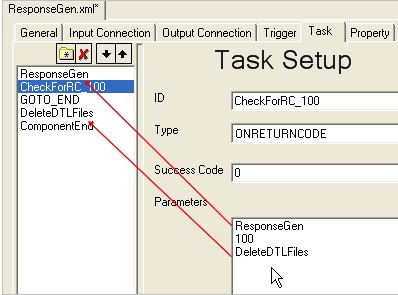
ONRETURNCODE If the return code of the task matches a given value, branch to another task. Otherwise, execute the next task in the list. Parameters:
|
|
Type |
Description |
|---|---|
|
|
JAVA Load and run a class written in Java. This can be a user-written class. It must support an Automator Java Task interface. Parameters:
|
|
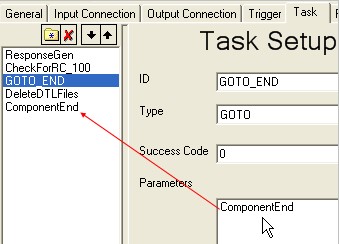
GOTO Unconditionally jump to another task. Parameters: The first parameter line is the task ID to go to. Example:
|
|
|
|
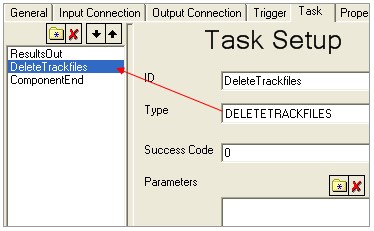
DELETETRACKFILES If track files have been retained to this point, delete them. Parameters: None Example:
End Marks the end of processing for this component. Similar to an END statement in other programming languages. Parameters: None
|
|
Success Code |
Type the return code that the application uses for success. Typically, this is 0. Most Instream components use 100 for success. Success codes 1000 and 1001 override the normal error handling for this task. See Error Handling Behavior on page 50. |
|
Parameters |
These are described under each type above. |
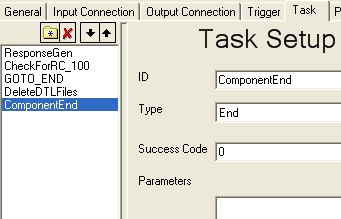
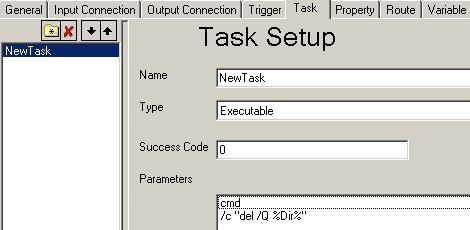
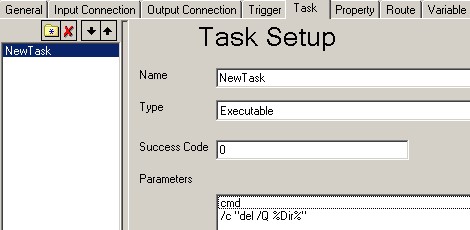
Task Tab Example: Simple Component to Delete Files
The component below does two things:
-
Opens a command window.
-
Deletes all files from the directory specified by the workflow, without displaying a confirmation message before each file is deleted.