Detail Record Output Section
The [Detail Record Output] section of the APF file determines which records will appear in the Instream validation results file.
Foresight Studio (Does not apply to HIPAA Validator Desktop)
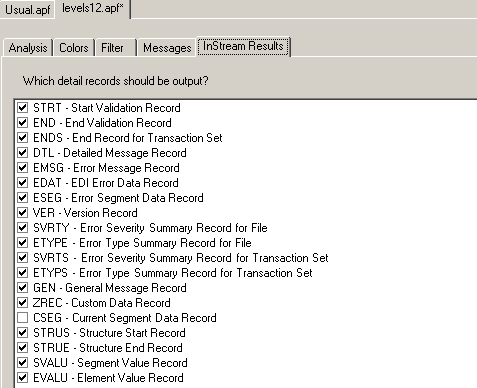
APF File Default Settings
[Detail Record Output]
CSEG=0
|
GEN=1
|
CTX=0
|
IDENT=0
|
DTL=1
|
STRT=1
|
EDAT=1
|
STRUE=1
|
ELOC=0
|
STRUS=1
|
EMSG=1 |
SVALU=1
|
END=1
|
SVRTS=1
|
ENDS=1
|
SVRTY=1
|
ESEG=1
|
UID=0
|
ETYPE=1
|
VER=1
|
ETYPS=1
|
ZREC=1
|
EVALU=1
|
|
In APF File (Default Settings Shown) |
In Foresight Studio Profile Box |
Result |
|---|---|---|
|
[Detail Record Output]
|
Instream Results tab |
|
|
CSEG=0 |
CSEG Default = unselected
|
Should the detailed results file contain a Current Segment Data (CSEG) record for each segment in the EDI file? These echo the actual contents of each EDI segment as it is read. CSEG=1 will inflate the size of the detailed results file. |
|
CTX=0 |
N/A |
Should the detailed results file contain segment context CTX segments? CTX=1 creates these segments, which are used by Response Generator to create 999 segment context CTX segments. This setting does not affect business unit identifier CTX segments in Response Generator 999s. Refer to Appendix H: CTX Segments in Response Generator 999s in |
|
DTL=1 |
DTL Default = selected
|
Should the detailed results file contain Detailed Message (DTL) records for warnings, errors, or information messages? Important: Use caution when changing this setting to DTL=0 (off), as both Response Generator and DocumentSplitter rely on DTL records.
If DTL is set to 0 (off): - Response Generator will not find errors in a document, even if they are present. - DocumentSplitter will not find invalid loops in a document, possibly causing an invalid document to be considered valid |
|
EDAT=1 |
EDAT Default = selected
|
Should the detailed results file contain an EDI Error Data (EDAT) record after each DTL record? These show the actual contents of the EDI data element that caused the warning, error, or information message. |
|
ELOC=0 |
ELOC Default = unselected
|
Should the detailed results file contain an Error Location (ELOC) record for errors in the 10000-29999 range? These appear after each EMSG record, and show location information - the names of the element, composite, segment, and loop referred to by the DTL record. Response Generator uses these with the %Error_NonTech% custom report variable to create non-technical error messages in custom reports. TIBCO Foresight® Transaction Insight® uses ELOC records to provide non-technical wording if the user selects non-technical error messages. |
|
EMSG=1 |
EMSG Default = selected
|
Should the detailed results file contain an Error Message (EMSG) record after each DTL record? These show the actual text of warnings, errors, or information messages. |
|
EMSGSEVERITY=n
|
N/A |
EMSG is suppressed in the Instream detailed results file when its severity is greater or equal to n. Example: EMSGSEVERITY=3 causes EMSG to show up only if the Severity for a DTL record is at least 3. EMSG is checked first. If EMSG=0, then EMSGSEVERITY is ignored. |
|
END=1 |
END Default = selected
|
Should the detailed results file contain an End (END) record at the end of the file? This shows the date and time when validation ended, and the name and size of the EDI file validated. HIPAA Validator Online users should leave this set to 1. |
|
ENDS=1 |
ENDS Default = selected
|
Should the detailed results file contain an End Record for Transaction Set (ENDS) record at the end of each transaction set? It shows the number of lines and segments, and the transaction set control number. HIPAA Validator Online users should leave this set to 1. |
|
ESEG=1 |
ESEG Default = selected
|
Should the detailed results file contain an Error Segment Data (ESEG) record for each DTL record? These show the actual contents of the EDI segment that caused the corresponding DTL record’s warning, error, or information message. |
|
ETYPE=1 |
ETYPE Default = selected
|
Should the detailed results file end with an Error Type (ETYPE) record? This contains counters for each message type for the entire file. |
|
ETYPS=1 |
ETYPS Default = selected
|
Should the detailed results file contain a Set Error Type Summary (ETYPS) record at the end of each transaction set? This contains counters for each error type found in the preceding transaction set. |
|
EVALU=1 |
EVALU Default = selected |
For future enhancement. |
|
GEN=1 |
GEN Default = selected
|
Should the detailed results file contain General Message (GEN) records? These contain informational messages. Currently, some errors may be reported in GEN records. These GEN record errors will be migrated to DTL records in a future release. |
|
IDENT=0 |
N/A |
For internal TIBCO Foresight use. Turns on the generation of IDENT records in the validation detail results file. |
|
STRT=1 |
STRT Default = selected
|
Should the detailed results file contain a Start (STRT) record? This shows information about the validation such as the date and time when the validation started, and the name and size of the EDI file being validated. 0 No 1 Yes HIPAA Validator Online users should leave this set to 1. If you are using Trading Partner Automation, the setting of STRT in $fsdeflt.apf will be used, even if your CSV file points to another APF file. |
|
STRUE=1
|
STRUE Default = selected |
Should the detailed results file contain Structure End Records? Used by DocSplitter and Response Generator. |
|
STRUS=1
|
STRUS Default = selected |
Should the detailed results file contain Structure Start Records? Used by DocSplitter and Response Generator. |
|
SVALU=1
|
SVALU Default = selected |
Should the detailed results file contain Segment Value Records? Used by DocSplitter and Response Generator. |
|
SVRTS=1 |
SVRTS Default = selected |
Should the detailed results file contain a Set Error Severity Summary (SVRTS) record after every transaction set? This contains counters for each severity found in the preceding transaction set. |
|
SVRTY=1 |
SVRTY Default = selected |
Should the detailed results file contain an Error Severity Summary (SVRTY) record? This contains counters for each severity level for the entire file. |
|
UID=0 |
UID Default = unselected
|
You can activate your guideline's GenerateFSUID business rules by setting the UID=1 line in the [Detail Record Output] section of the APF file being used for Instream validation. See “GenerateFSUID” in TIB_fsp_desktop_n.n.n_BusinessRules.pdf. |
|
VER=1 |
VER Default = selected |
Should the detailed results file contain a Version (VER) record as the first record? This shows the version of the detail results file. |
|
ZREC=1 |
ZREC Default = selected
|
Should the detailed results file contain Custom Data (Z) records? These display the contents of actual data elements. If using DocSplitter with content-based splitting, or if you are using your own custom records or are using content-based splitting. |