Inbound and Outbound Documents
Transaction Insight distinguishes between inbound and outbound data to make it easier for you to find your own company’s data.
Example from Transmission Volumes page:
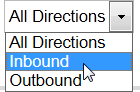
Example from Documents page

Inbound and Outbound are from the point of view of the Transaction Insight host:
| Inbound | Data sent to the host’s organization. |
| Outbound | Data sent from the host’s organization. |
It is not dependent on sender and receiver IDs and is not determined by reading ISA or GS values.
Importer’s -o or -i command-line qualifiers mark data as inbound or outbound. This is generally built in to TIBCO Foresight® Studio® workflows. When Importer reads data from the inbound directory, it flags it as inbound. When it reads data from the outbound directory, it flags it as outbound.
Examples of Inbound and Outbound Data
If the Transaction Insight host is an insurance company, 837 data that it receives is inbound data. 835 data it sends to providers is outbound data.
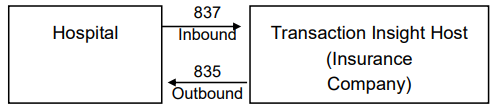
If the Transaction Insight host is a clearinghouse, 837 data that it receives from providers is inbound even though the receiver ID might be an insurance company. The clearinghouse then repackages the 837 and sends it on to an insurance company. This transmission of the 837 is now outbound.
