Using Search Time Control
The Transmission Search page has a control called Search Time.
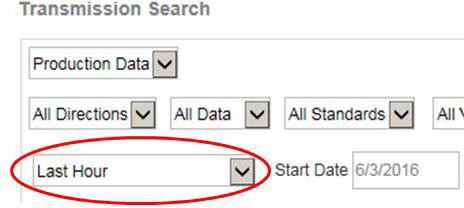
The default for this setting is specified by the Transaction Insight administrator and it is displayed as the first (top) search time selection on the Time Range control drop-down menu. The Transaction Insight administrator can also control your use of the Start Date/Time and End Date/Time fields by enabling/disabling your default access to the associated controls.
You can select a different time by accessing the Search Time drop-down menu.
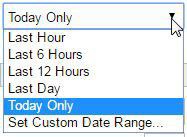
Additional information about search time ranges:
-
The "Today Only" option is defined as from 00:00 to the current time.
-
The system always rounds up to the nearest 5-minute increment. This ensures that the End Time include the most recent transmissions.
Example: If the default is "Last 6 Hours" and the current time is 13:32, the Start Time is 7:35 and the End Time is 13:35.
A default has also been set by the Transaction Insight Administrator that impacts your ability to access the Start Date/Time and End Date/Time fields. You might find fields are disabled when you initially access the Transmission Search Page.
To re-enable the Start Date and End Date controls:
-
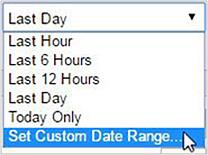
Choose "Select Custom Date Range" from the drop-down menu on the Transmission Search Page.
-
Note that the Start Date/Time and End Date/Time fields are now enabled. Select a custom date and time range using the Start Date/Time and End Date/Time controls.
-
Select additional filter values as desired.
-
Click the Search button.
Additional information about search time ranges:
-
If the Start Date/Time and End Date/Time fields are enabled, the time interval specified is retained; it is not automatically re-adjust if time passes between searches. Example: You select "Set Custom Date Range" and request data for the current date from 10:05 to 12:05 and click Search. You return to the same search 30 minutes later and click Search again. The selected time range remains 10:05 to 12:05.
-
If the Start Date/Time and End Date/Time fields are disabled, the time interval you've specified is automatically re-adjusted if time passes between searches.
For example: You select "Last Hour" at 10:15 and click Search. You return to the search 10 minutes later and click Search again.
The system automatically re-adjusts the time for the selected time range ("Last Hour"), returning data from the last hour beginning at the current time, now 10:25. This ensures you are always receiving data for the true last hour.