Persistence Concepts
The key building blocks of FTL persistence are Persistence Clusters and Persistence Stores.
In addition, when configuring persistence, you should expect to make at least these choices:
Will messages be persistent (preserved on server restart) or non-persistent (lost on server restart)? In FTL, “persistent” is referred to as “replicated”, and “non-persistent” is referred to as “non-replicated”. See Replication.
How will FTL server store messages? In FTL, persistent (replicated) messages can be stored in memory for greater performance, or on disk for greater durability. Non-persistent (non-replicated) messages are always stored in memory. See Storage.
What publisher mode will FTL clients use? In FTL, publishers may block in the send call until the server confirms that the message is stored. Or, for greater performance, publishers may return immediately from the send call, without knowing whether the message was stored successfully. See Publisher Send Mode.
Persistence Clusters
A persistence cluster consists of a set of persistence services. A persistence service runs as part of an FTL server. You provision persistence services by editing the FTL server yaml configuration file. See FTL Server and Services. You must also define persistence clusters and services in the FTL realm definition. See Configuring Persistence and FTL Server GUI: Configuration.
Alternatively, a default persistence cluster, consisting of a set of default persistence services, is automatically defined and provisioned when starting a cluster of FTL servers for the first time.
The persistence services in a cluster communicate with each other, choose a leader, and form a quorum. FTL clients always communicate with the leader. FTL clients cannot send or receive messages from the persistence cluster if there is no leader.
Persistence clusters provide fault tolerance. If the leader dies, or becomes unreachable on the network, another persistence service is chosen to be leader, a new quorum forms, and FTL clients fail over to the new leader. In general, to form a quorum, more than half of the persistence services in a cluster must be running and reachable. For example, 2 out of 3 services can usually form a quorum, but 1 out of 3 services cannot form a quorum. See Persistence Services and Clusters for more details about forming a quorum.
The leader replicates message and acknowledgment data to whichever members of the cluster are currently reachable and participating in the quorum. All members of the cluster store data either in memory or on disk. See Storage. Messages are organized into persistence stores, as described in Persistence Stores.
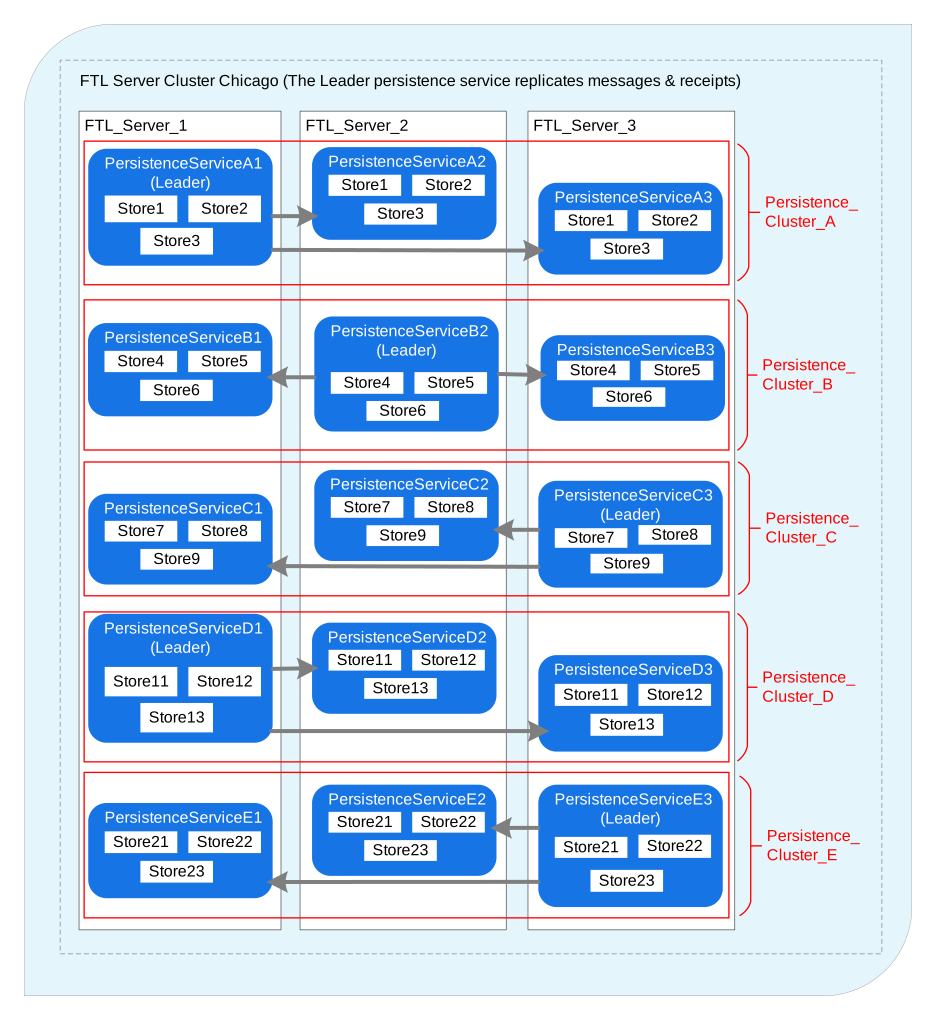
For example, in the following diagram, there are three FTL servers with five persistence services in each server. There are five persistence clusters of three members each.
Persistence Stores
A persistence cluster manages a set of persistence stores. A persistence store is a set of configuration parameters that determine how published messages are handled. For example, the persistence store determines whether:
-
Messages are replicated to all persistence services. See Replication.
-
Messages are routed to other persistence clusters. See Routing.
-
Publishers block in the send call or return immediately. See Publisher Send Mode.
Persistence stores can also be used to set limits on how much data is stored, either by the total number of messages or the total size of messages.
By default, a persistence store is owned by one persistence cluster. However, a persistence store can be routed, in which case its messages are distributed to all persistence clusters in a persistence zone. See Routing.
Administrators choose which persistence stores an FTL client uses. The choice of store determines the persistence cluster. (In the routing case, the FTL client uses whichever persistence cluster is available locally.)
In the destinations messaging model, each configured destination is mapped to a persistence store.
In the content matching messaging model, each endpoint is mapped to a persistence store.
Replication
A persistence store may be either replicated (“persistent”) or non-replicated (“non-persistent”). See Stores Grid.
In a replicated store, all message and acknowledgment data is replicated by the leader to the other members of the persistence cluster. Therefore, if the leader restarts or becomes unreachable, messages and acknowledgments are preserved. FTL clients fail over to the new leader and continue publishing and consuming messages.
If a synchronous publish or acknowledge call takes place in a replicated store, then the following will occur:
-
The FTL client sends its request to the leader.
-
The leader replicates the data to the other members of the cluster.
-
The leader stores the data in memory or on disk, as described in Storage.
-
Concurrently, the leader waits for a majority of members to respond, indicating that the data is stored. Data may be stored in memory or on disk, as described in [Storage].
-
The leader responds to the client.
In a non-replicated store, all message and acknowledgment data is stored only in the memory of the leader. Therefore, if the leader restarts or becomes unreachable, all pending messages are lost.
If a synchronous publish or acknowledge call takes place in a non-replicated store, then the following will occur:
-
The FTL client sends its request to the leader.
-
The leader immediately responds to the client.
Non-replicated stores offer reduced latency and improved throughput at the expense of message durability.
Publish and acknowledge calls are not always synchronous. See Publisher Send Mode and Subscriber Acknowledgment.
Storage
In non-replicated stores, message and acknowledgment data is always stored in the memory of the leader.
In replicated stores, message and acknowledgment data may be stored in memory or on disk. This is a cluster-wide setting; see Cluster Details Panel.
In-memory storage offers improved performance at the expense of durability. When a persistence service restarts, it must copy all message and acknowledgment data from other members of the cluster before rejoining the quorum. In addition, if a majority of the persistence services in the cluster fail simultaneously, data may be lost.
For storage on disk, you supply a data directory in the FTL server yaml configuration file; see FTL Server and Services. FTL offers two modes for storage on disk:
-
Sync: The leader responds to the client after a majority of members have written the data (message or acknowledgment) persistently to disk. This mode generally provides high durability at the cost of increased latency and lower throughput.
-
Async: The leader responds to the client after a majority of members have instructed the OS to write the data (message or acknowledgment) to disk. The write may be lost if the OS crashes or the host computer loses power. This mode generally provides reduced latency and higher throughput, but messages could be lost if a majority of host computers fail simultaneously.
See Disk-Based Persistence for more details regarding on-disk storage, including compactions.
Indexes on Disk
If disk-based persistence is enabled, you might optionally configure the persistence cluster to store message indexes and metadata on disk (in addition to the message data itself).
The indexes on disk feature offers better scaling for large message backlogs (a large number of unacknowledged messages). Specifically, there are two advantages:
-
Constant memory usage: The persistence service does not consume memory for each pending message. Storing additional messages does not increase memory usage.
-
Constant recovery time: When the persistence service restarts, it does not need to read message data from disk. Recovery time is minimal, regardless of how many pending messages are stored.
Therefore, the indexes on disk feature may be particularly advantageous if you are planning for large message backlogs (or if there might be an unplanned message backlog).
The semantics of sync and async disk persistence do not change when the indexes on disk feature is enabled.
For more details, see Disk-Based Persistence.
Message Swapping
If memory on FTL server’s host computer is constrained, persistence services can swap messages to disk. Swapping reduces persistence service memory usage at the expense of additional disk I/O.
This is a cluster-wide setting; see Cluster Details Panel.
When message swapping is enabled, there are different effects, depending on the persistence cluster and store configuration. Consider the following cases. Note that for every configuration except indexes on disk, some metadata is retained in persistence service memory for each message.
-
Non-replicated stores: Messages in non-replicated (non-persistent) stores are swapped to disk. (Recall that configuration for disk persistence does not affect non-replicated stores.) An asynchronous write is issued as messages are published by FTL clients. When messages are delivered to consumers, a read might be required. There must be enough disk bandwidth to support the messaging rate. To summarize:
-
Message data is freed from memory.
-
Some metadata is retained in memory for each message.
-
-
Replicated stores with in-memory storage: If in-memory storage is configured (no disk persistence), messages in replicated (persistent) stores are swapped to disk. An asynchronous write is issued as messages are published by FTL clients. When messages are delivered to consumers, a read might be required. There must be enough disk bandwidth to support the messaging rate. To summarize:
-
Message data is freed from memory.
-
Some metadata is retained in memory for each message.
-
-
Replicated stores with disk-based persistence, indexes on disk disabled:. If disk persistence is enabled, but indexes on disk are not enabled, messages in replicated (persistent) stores are written to disk as normal, and no additional write occurs. A read might be required when delivering messages to consumers. To summarize:
-
Message data is freed from memory.
-
Some metadata is retained in memory for each message.
-
-
Replicated stores with disk-based persistence, indexes on disk enabled: If disk persistence and indexes on disk are enabled, messages in replicated (persistent) stores are written to disk as normal, and no additional write occurs. A read might be required when delivering messages to consumers. To summarize:
-
Message data is always freed from memory, even if message swapping is disabled.
-
Message metadata is always freed from memory, even if message swapping is disabled.
-
Publisher Send Mode
Each persistence store has a publisher mode. The publisher mode may be store_confirm_send or store_send_noconfirm. See Stores Grid.
If the publisher mode is store_confirm_send, then the publisher will not return from the send call until the persistence cluster leader confirms that the message has been stored. For example, if disk-based persistence is enabled, and the persistence store is replicated, the send call will not return until a majority of persistence services have written the message to disk. This publisher mode offers stronger delivery assurance at the expense of increased latency and lower throughput.
If performance with store_confirm_send is inadequate, consider increasing the number of publishers. Or, you may modify your application to use the non-inline send policy, which improves throughput at the expense of a somewhat more complex application. See Publishers for more information.
If the publisher mode is store_send_noconfirm, then the publisher will return from the send call regardless of whether the persistence cluster stored the message. The message is lost if the persistence cluster did not receive the message, or no leader was available at the time. In addition, the client program is responsible for ensuring that it does not send messages too quickly. If it sends messages faster than the persistence cluster can replicate and/or store them, then messages will be lost. This publisher mode offers reduced latency and higher throughput at the cost of weaker delivery assurance and a potentially more complex application.
Topic Subscriptions
An FTL client’s interest in a topic is represented by a durable. So long as the durable exists, the persistence cluster will store messages sent to the topic, to be delivered to subscribers connected to the durable.
To subscribe on a topic, FTL client programs pass a topic name and durable name to the subscribe call. There may be many durables on a given topic, each with a different durable name. The topic is mapped to a persistence store in the FTL realm definition.
When creating a subscriber on a topic, the client program must also choose what type of subscription to create. There are three subscription types:
-
Standard: The durable is associated with one subscriber. All messages sent to the topic are delivered to all standard subscriptions on the topic. Creating a second subscriber with the same durable name will cause the first subscriber to be closed, and messages will be delivered to the second subscriber.
-
Shared: The durable is associated with one or more subscribers. All messages sent to the topic are delivered to one of the subscribers on the durable. Shared subscriptions allow multiple client programs to parallelize the work of consuming messages on a topic.
-
Lastvalue: The durable is associated with one or more subscribers. When a subscriber starts, it receives the last message sent on its topic (rather than all messages). Subsequent messages published to the topic are delivered to each online subscriber on that topic. Lastvalue subscriptions allow subscribers to initialize to the most recent state for a topic, and then receive updates for that topic.
See Destination Concepts and Subscribers for more information.
Queue Subscriptions
The persistence cluster will store messages sent to a queue, regardless of whether any subscribers have ever existed.
To subscribe to a queue, FTL client programs pass the queue name to the subscribe call. The queue is mapped to a persistence store in the FTL realm definition.
Queue subscriptions are shared, meaning multiple client programs may subscribe to the queue. Messages sent to the queue are delivered to any one of the subscribers.
See Destination Concepts and Subscribers for more information.
Content Subscriptions
This information does not apply to the destinations messaging model.
In the content matching messaging model, subscribers express interest by indicating what message fields, or combination of message fields, they expect to receive. See FTL Configuration Overview.
To subscribe, FTL client programs pass a durable name, endpoint name, and content matcher to the subscribe call. The durable name identifies the subscription. The endpoint name is mapped to a persistence store in the FTL realm definition. The content matcher determines the names and values of certain expected fields in the message.
The endpoint name is also mapped to a dynamic durable template in the FTL realm definition. The administrator chooses the subscription type by configuring an appropriate durable template.
There are three types:
-
Standard: The durable is associated with one subscriber. All messages sent to the persistence store that match the durable’s interest are delivered to its subscriber. Creating a second subscriber with the same durable name will cause the first subscriber to be closed, and messages will be delivered to the second subscriber.
-
Shared: The durable is associated with one or more subscribers. All messages sent to the persistence store that match the durable’s interest are delivered to one of the subscribers on the durable. Shared subscriptions allow multiple client programs to parallelize the work of consuming messages on a topic.
-
Lastvalue: The durable is associated with one or more subscribers. When a subscriber starts, it receives the last message sent that contains the key field and value that the subscriber indicated in its content matcher (rather than all messages). Subsequent messages published are delivered to each online subscriber on that key. Lastvalue subscriptions allow subscribers to initialize to the most recent state for a key, and then receive updates for that key. See Stores for Last-Value Availability.
See Persistence Stores for Content Matching for more information.
Subscriber Acknowledgment
In general, when a subscriber receives a message, it must acknowledge the message after processing it. When a subscriber acknowledges a message, the persistence cluster will replicate and store the acknowledgment, just as it would for message data. If the message is no longer needed (there are no more subscribers), each persistence service in the cluster will delete the message from storage. Acknowledgments that are no longer needed will also be deleted from storage.
Lastvalue subscribers (topic-based or content-based) do not acknowledge messages. The most recent message is replaced whenever a new message is published.
All other subscribers do acknowledge messages.
-
If the client program specifies explicit acknowledgment when creating a subscriber, then the client program must issue an acknowledge call for each message.
-
Otherwise, the FTL library will automatically issue the acknowledge call once the subscriber’s dispatch callback returns, for all messages processed by the callback.
Subscribers also have an acknowledgment mode (sync or async).
-
Sync acks: Acknowledgment calls are synchronous. The call does not return until the persistence cluster confirms that it has stored the acknowledgment. This type of acknowledgment minimizes duplicates.
-
Async acks: Acknowledgment calls are asynchronous. FTL will send the acknowledgment in the background on a timer. Duplicates can occur if the client program fails before the acknowledgment is sent.
Client programs may specify the acknowledgment mode (sync or async) when creating a topic or queue subscriber. If no acknowledgment mode is specified, the administrator can specify a default value in the destination configuration. See Destination Details Panel.
Otherwise, if you are using the content matching messaging model, then administrators specify the acknowledgment mode (sync or async) when creating the dynamic durable template for the client program’s endpoint.
Routing
Persistence stores may be routed or non-routed. Non-routed stores are owned by one persistence cluster. Message and acknowledgment data exists only at that persistence cluster.
You may wish to replicate messages to different geographic regions. However, locating the persistence services of a persistence cluster in different regions may result in poor performance due to higher network latencies or reduced network reliability. Instead, consider running one persistence cluster in each region and creating routes between them. In FTL, routes are implemented by creating routed (or “wide-area”) persistence stores.
Routed stores belong to one or more forwarding zones. A forwarding zone is a set of persistence clusters that connect to each other to exchange messages. See Zones Grid.
The routed store exists at each persistence cluster in each forwarding zone to which the store belongs. When an FTL client interacts with a routed persistence store, it will use whichever persistence cluster exists at the FTL server(s) to which the FTL client connects. FTL client API calls return when the local persistence cluster confirms that the message is stored locally (not necessarily replicated across regions).
A message published at any one of the clusters may be forwarded to all other clusters in all forwarding zones to which the persistence store belongs. Forwarding zones can be “chained” together if a persistence cluster belongs to more than one forwarding zone.
Queues and maps cannot be created in routed stores.
Topic subscriptions of any type can be created in routed stores. A message sent to a topic at one persistence cluster will be forwarded to the other persistence clusters in the forwarding zone(s), provided that the other cluster has interest (has a subscription for the topic).
For users of the content matching message model: Content-based subscriptions of any type can be created in routed stores. A message sent to a persistence store at one persistence cluster will be forwarded to the other persistence clusters in the forwarding zone(s), provided that the other cluster has interest (has a matching subscription for the message).
In the following diagram, StoreS is a wide-area (routed) store and is assigned to Zone Z.
The FTL server clusters in Zone Z are: Rio, London, and Tokyo. Each cluster implements a StoreS Projection from StoreS. For example, a publisher in the London Cluster publishes a message to the StoreS Projection with Durable B and then the message is made available to Durable A (Rio Cluster) and Durable C (Tokyo Cluster), as long as they are interested subscribers. StoreT is not a wide-area store, so it remains functionally outside Zone Z and local to the Tokyo cluster.
Disaster Recovery
In the event of a disaster, all persistence services in a persistence cluster may go offline or lose their underlying disk storage. If this happens, FTL clients would be unable to proceed, or stored messages might be lost.
In FTL, you may configure disaster recovery for each persistence cluster. If disaster recovery is configured, then message and acknowledgment data is replicated asynchronously to a disaster recovery site in a different location. FTL client API calls do not wait for data to be replicated to the disaster recovery site.
To configure disaster recovery, you create a persistence cluster with two “sets” of persistence services. See Clusters Grid.
One set is the “primary” set. The persistence services in the primary set choose a leader and form a quorum as usual. All FTL clients interact with the primary set.
The second set is the “standby” set. The persistence services in the standby set choose a leader to communicate with the primary set. The standby leader receives asynchronous data from the primary set and distributes it to the other persistence services in the standby set.
When a disaster occurs, you activate the “standby” set by changing its role to “primary”. You reconfigure DNS in your enterprise so that FTL clients reconnect to the former “standby”, now “primary” set. Since replication of data to the standby set was asynchronous, a tail end of the data may be lost.
See Disaster Recovery for full details on this procedure.
Monitoring and Logging
Persistence services can be managed via the FTL server GUI or the FTL server web API.
Monitoring metrics from the persistence service can be accessed via FTL server’s prometheus endpoint. The persistence service also logs various statistics periodically, such as disk usage and write rates. See Persistence Monitoring and Management. See also Catalog of Persistence Metrics.
For development and debugging purposes, tracing of individual messages can be enabled. See Message Tracing.
Permissions
If you have enabled authentication at FTL server, you may optionally enable fine-grained permissions for destinations or persistence stores. See Authentication and Authorization.