Copyright © Cloud Software Group, Inc. All Rights Reserved


Chapter 3 Using the XML Interface : Invoke URL

Invoke URL
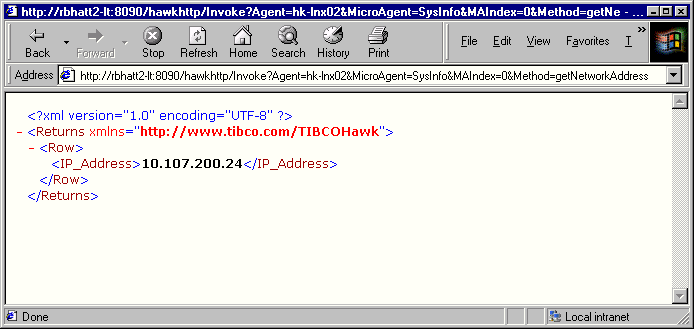
Invoking this relative URL on a specified agent and microagent invokes or subscribes the specified method on the agent. You can specify either a synchronous or an asynchronous method. A dynamic XML document is generated listing the returned information.
Figure 6 Invoke URL Sample Output
Required Parameters
Required parameters for the Invoke URL are:
Agent  Name of agent
MicroAgent  Name of microagent
Method  Synchronous or asynchronous method to be invoked. If the method takes a parameter, include it in the relative URL. You can pass a null value.
If you do not include a required parameter, the server returns an error.
Optional Parameters
Optional parameters for the Invoke URL are:
Style   A specific XSLT/XPATH stylesheet. If the stylesheet takes parameters, you can include them in the relative URL. If Style is not included, the server uses the default stylesheet, Ident.xsl.
Domain   A specific TIBCO Hawk domain. If this parameter is not included, the server uses the domain default.
MAIndex   (Use this parameter when duplicate instances of the same microagent exist.) A microagent instance index number. The adapter gives the index number 0 to the first instance of each microagent. Additional instances of the same microagent are numbered 1, 2, 3 ... n.
To invoke a method on a specific microagent instance, specify the instance’s index number using this parameter. If this parameter is omitted or included without a value, the server uses a default instance index value of 0.
If you specify an optional parameter that does not exist, such as a stylesheet that is not in the HAWK_HOME/webconsole/tomcat/webapps/http/xsl directory, the server returns an error.
Examples
Example 1
The following relative URL invokes the method getUptime on the microagent Self with an Instance index of 0 on Agent Solaris_26. Because no domain is specified, the default domain is used. The stylesheet Result.xsl is applied to the document.
   http://localhost:8081/http/Invoke?Agent=Solaris_26&MicroAgent=Self&MAIndex=0&Method=getUptime&Style=Result.xsl
Example 2
The following relative URL invokes the getConfig method on the microagent Network with an Instance index of 0. It includes the parameter Interface+Name with an empty value, which returns information on all interfaces in the getConfig method.
   http://localhost:8081/http/Invoke?Agent=Solaris_26&MicroAgent=Network&MAIndex=0&Method=getConfig&Interface+Name=
The following relative URL is a slight variation of the previous relative URL. Here, the interface name is specified as hme0.
http://localhost:8081/http/Invoke?Agent=Solaris_26&MicroAgent=Network&MAIndex=0&Method=getConfig&Interface+Name=hme0
Example 3
The following relative URL invokes the getProcess method in the new domain on the rbhatt2-lt agent on the Process microagent with an Instance Index of 0. It retrieves all processes that start with ^t. The expression ^t is represented by the standard encoding %5Et.
http://localhost:8081/http/Invoke?Agent=rbhatt2-lt&Domain=new&MicroAgent=Process&MAIndex=0&Method=getProcess&Process+Name=%5Et
Example 4
The following relative URL is a synchronous subscription to the getInstanceCount method on the Solaris_26 Agent on the Process microagent with an Instance Index of 0. This is a synchronous subscription, not an invocation, because the Interval parameter specifies a subscription interval (5 seconds) and the Subscribe parameter is included with a value of Subscribe.
http://localhost:8081/http/Invoke?Agent=Solaris_26&MicroAgent=Process&MAIndex=0&Method=getInstanceCount&Process+Name=tibhawkhma&Interval=5&Subscribe=Subscribe
This subscription generates the following XML data (bold text for emphasis):
<?xml version="1.0" encoding="UTF-8" ?>
"<Returns xmlns="http://www.tibco.com/TIBCOHawk">"
<SubscriptionId>4</SubscriptionId>
<AgentName>Solaris_26</AgentName>
<MicroAgentName>Process</MicroAgentName>
<MethodName>getInstanceCount</MethodName>
<ResultURL>http://localhost:8081/http/Invoke?Subscription=4</ResultURL>
</Returns>
To retrieve the subscription result, invoke the relative URL shown in the <ResultURL> tag. In the example above, you would invoke the relative URL http://localhost:8081/http/Invoke?Subscription=4.
Example 5
The following relative URL subscribes to the onApplicationEvent asynchronous method on the smart Agent in the new TIBCO Hawk domain on the EventLog microagent with an Instance Index of 0. This asynchronous method uses the Source parameter but does not specify a value.
http://localhost:8081/http/Invoke?Agent=smart&Domain=new&MicroAgent=EventLog&MAIndex=0&Method=onApplicationEvent&Source=
A successful subscription generates the following XML data (bold text for emphasis):
<?xml version="1.0" encoding="UTF-8" ?>
<Returns xmlns="http://www.tibco.com/http">
<SubscriptionId>2</SubscriptionId>
<AgentName>smart</AgentName>
<MicroAgentName>EventLog</MicroAgentName>
<MethodName>onApplicationEvent</MethodName>
<ResultURL>http://localhost:8081/http/Invoke?Subscription=2</ResultURL>
</Returns>
To retrieve the subscription result, invoke the relative URL shown in the <ResultURL> tag. In the example above, you would invoke the relative URL http://localhost:8081/http/Invoke?Subscription=2.

Copyright © Cloud Software Group, Inc. All Rights Reserved