|
| Copyright © Cloud Software Group, Inc. All Rights Reserved |
TIBCO Hawk HTTP Adapter contains a sample HTML application. The XML data is retrieved using four relative URLs as described in the previous chapter. The JSP/JSTL pages format the XML data and generate the HTML Web pages.The HTML application included with TIBCO Hawk HTTP Adapter provides the following views of your TIBCO Hawk environment:
All TIBCO Hawk domains in the enterprise that are configured in the web.xml file. All methods in the selected microagent on the selected agent. All pages have a Return to Main page link that takes you back to the TIBCO Hawk HTTP Adapter Index Page.Many of the HTML pages contain an alert state indicator in a column titled Highest Alert State. The alert level shown in this column is the highest current alert state in any of the agents in that cluster. Other lower-level alerts and informational messages may also currently exist in the agent; only the highest active alert level is shown in this field.
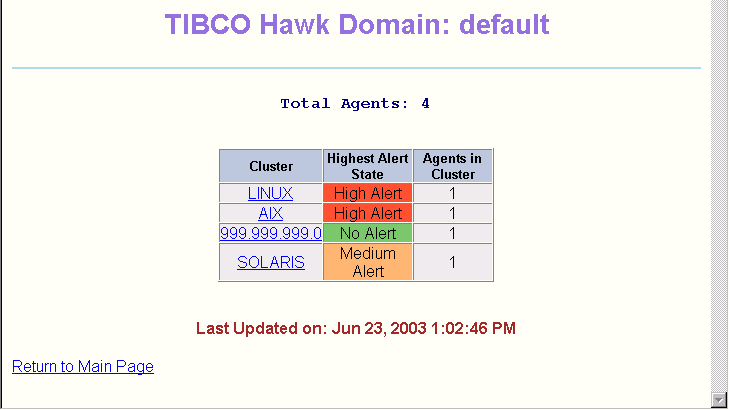
The presence of informational messages is not indicated in the Highest Alert State column. To determine if an agent has an informational message, display the Alert Details view.For example, the following sample Domain View screen shows the clusters in the TIBCO Hawk domain named default.
• The LINUX and AIX clusters each have one agent. Each agent currently has a High alert, and neither agent is expired. Each agent may also currently have Medium or Low alerts, or an informational message. You can click on either cluster name to view the current status of the agent and information about the current alerts or messages.
• The 999.999.999.0 cluster has one agent, and there are currently no alerts in that agent. There may be informational messages. You can click on the cluster name to view the status of the agent.
• The SOLARIS cluster has one agent with at least one Medium alert. There may also be one or more Low alerts or informational messages in the agent. You can click on the cluster name to view the status of the agent in the SOLARIS cluster and display information about the alerts and messages.You can customize the data displayed along with the look and feel of the HTML application by modifying the following files. These files are written using standard HTML. The XML stream is formatted using JSP/JSTL and XSLT stylesheets.
It is a good idea to study the existing file before making changes. Always work on a copy of the original file.The look and feel of the HTML pages is controlled by a cascading stylesheet. TIBCO Hawk HTTP Adapter contains two cascading stylesheets, one for JRun4 and one for all other supported Web servers. Modify the correct file for the Web server used in your configuration.
•
• Each JSP has a default refresh interval of 15 seconds. You can customize the refresh interval for each JSP by modifying the appropriate parameter in the file HAWK_HOME/webconsole/tomcat/webapps/http/WEB-INF/web.xml.The date and time that the information on each screen was last updated is shown at the bottom of each screen. You can customize the display format by modifying the file HAWK_HOME/webconsole/tomcat/webapps/http/jsp/HawkTime.jsp.
The following table lists the default HTML color scheme for the TIBCO Hawk HTTP Adapter alert states. To change the default colors, modify the file HAWK_HOME/webconsole/tomcat/webapps/http/xsl/http/jsp/HawkAlert.jsp.
|
| Copyright © Cloud Software Group, Inc. All Rights Reserved |