Copyright © Cloud Software Group, Inc. All Rights Reserved


Chapter 4 Using the Sample HTML Interface : Domain View

Domain View
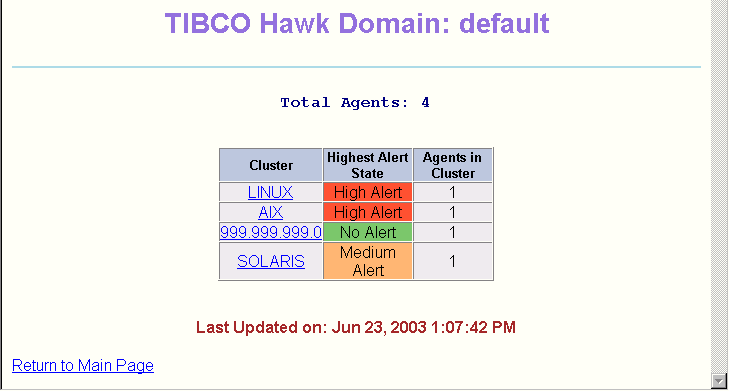
This view appears when you click a domain name in the Enterprise View. It displays information about the clusters in the selected domain.
The Cluster column lists the names of the clusters in the domain. The Highest Alert State column shows the highest alert state of any agent in each cluster, and the Agents in Cluster column indicates how many agents are in each cluster.
For example, the sample screen above indicates that:
There are four clusters in this domain: LINUX, AIX, 999.999.999.0 and SOLARIS.
The agent in the 999.999.999.0 cluster does not currently have any alerts, although it may have an informational message.
The agent in the LINUX cluster and the agent in the AIX cluster have at least one active High alert each. They may also have one or more Medium or Low alerts or informational messages.
The highest current alert in the SOLARIS cluster is a Medium alert. There are no High alerts in the SOLARIS cluster, but there may be Low alerts or informational messages.
To view information about the agents and alerts in each domain, click the domain name. The Cluster View appears, described in the next section.

Copyright © Cloud Software Group, Inc. All Rights Reserved