Individual cells in the map are the alert levels represented as different colors and the size of the individual cell is directly proportional to the number of alerts/notifications of that type.
HeatMap implementation in Hawk WebConsole is a treemap representation. Treemaps display hierarchical (tree-structured) data as a set of nested rectangles. Each branch of the tree is given a rectangle, which is then tiled with smaller rectangles representing sub-branches. A leaf node's rectangle has an area proportional to a specified dimension on the data. The leaf nodes are colored to show a separate dimension of the data.
Top level heat map shows all alerts in all agents in all domains. You can drill down to any level of the hierarchy (dimension) to see the details. For example: if there are 4 domains, you can drill down to one domain to see all the agents in the domain in an expanded form. You can further drill down to an agent in the domain to see all alerts expanded view. You can drill down to the last level in the hierarchy.
The HeatMap gets updated in based on the configuration provided in web.xml. It can either be configured in
auto mode or in
timer mode.
If agent previously had less number of high alerts, the size of high alerts cell for the agent was small as compared to other cells. However, if the agent starts generating large number of high alerts, then the size of high alerts cell for the agent starts growing dynamically and all other cells in the entire heatmap are automatically adjusted accordingly.

button to apply changes. The heatmap will change accordingly.
Top level heat map shows all alerts in all agents in all domains. You can drill down to any level of the hierarchy (dimension) to see the details. For example: if there are 4 domains, you can drill down to one domain to see all the agents in the domain in an expanded form. You can further drill down to an agent in the domain to see all alerts expanded view. You can drill down to the last level in the hierarchy.The HeatMap gets updated in based on the configuration provided in web.xml. It can either be configured in auto mode or in timer mode.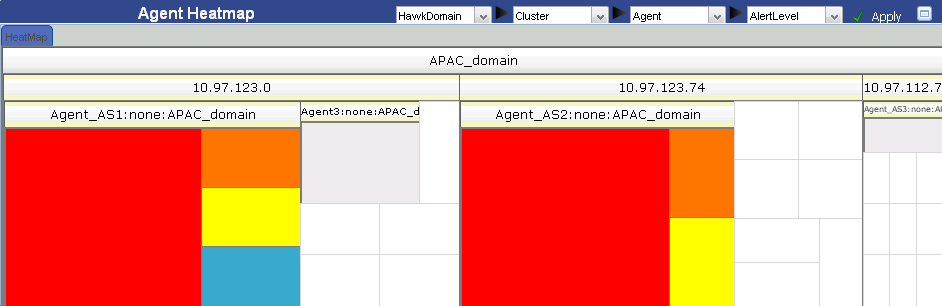
 - High
 - Medium
 - Low
- Low - Notification