JMS Provider Details Dialog
The JMS Provider Details dialog is used to configure the JMS provider details.
Figure 24: The JMS Provider Details Dialog
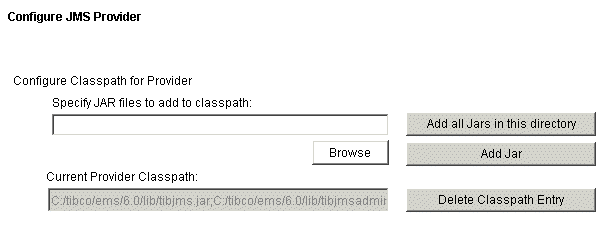
| 1. | The Current Provider Classpath is shown. |
If the values shown in this field are correct for your installation, click the Next button to continue past this dialog. If it is necessary to change the classpath, you can delete the current values by clicking Delete Classpath Entry.
| 2. | If you need to change the classpath displayed, you need to specify the tibjms, tibjmsadmin, and jms-2.0 (Only need to be specified when you use TIBCO EMS version 8.x or above as the JMS provider) JAR files that you wish to use, in the Specify JAR files to add to classpath field. Add all the JAR files that you want to add to the classpath using one of the following methods: |
| — | Click the Browse button, locate a specific JAR file and click Add Jar. |
| — | Specify a directory and click Add all Jars in this directory. |
Note: If you are upgrading from a previous version of TIBCO iProcess Technology Plug-ins, the existing path to
tibjms.jar appears here, but you must add the tibjmsadmin.jarandjms-2.0.jar (Only when you use TIBCO EMS version 8.x or above as the JMS provider) files manually.| 3. | Click the Next button. |