Copyright © Cloud Software Group, Inc. All Rights Reserved

Chapter 1 Introduction : Overview

Overview
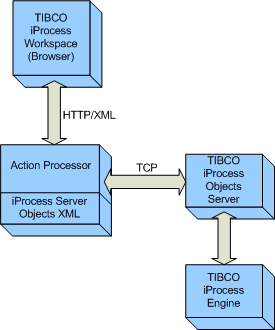
The TIBCO iProcess Workspace (Browser) Action Processor services action requests made by the TIBCO iProcess Workspace (Browser) application (which was developed using TIBCO® General Interface Builder).
Although the Action Processor is the engine that processes requests from iProcess Workspace (Browser), it can also be used directly from any application that can send HTTP requests and receive HTTP responses. The intent of this document is to provide details about each request/reply that is supported by the Action Processor so that it can be used by a custom application.
Each 'action' requested by the TIBCO® General Interface Builder GUI components can contain one or more of the following 'request' types:
The TIBCO® General Interface Builder GUI components send their action details to the Action Processor via a Form POST over HTTP — the action details are sent as XML on an HTML <input> tag.
The Action Processor also accepts actions via an HTTP GET. When doing a GET, the action XML needs to be sent as a URL parameter named 'action'.
Upon receiving an action request (that is not a form request), the Action Processor breaks the action into individual requests and processes each one. The resulting data from each request is then consolidated in XML under one root element (<ap:ActionResult>). The Action Processor then returns this XML data to the TIBCO® General Interface Builder GUI components over HTTP.
The Action Processor is implemented as both a Microsoft .NET ASP Web Application and as a Java Servlet. This has been done so as to satisfy both the Microsoft and customer base. The implementation of the two Action Processors is obviously very different but the functionality and configuration is the same.
Form Requests
If the action request is a form request, the Action Processor redirects the HTML to the client application — no XML is returned. Form requests are handled as follows:
1.
The Action Processor looks at the ExternalFormURI parameter in the Action Processor’s configuration file, apConfig.xml. If there is a value in this parameter, it assumes the form is an “External Form”, which means it’s an ASP Form, JSP Form, or FormBuilder Form. The Action Processor uses the value in the ExternalFormURI parameter as the “base” URI to the form’s location. The remainder of the URL is obtained from the value in the Formflow Form field in the step definition.
2.
If there is no value in the ExternalFormURI parameter, the Action Processor assumes the “default form” type, i.e., an iProcess Modeler-produced form. In this case, the form to display is defined in the step definition.
In the case of “GI Forms” (which includes both TIBCO® General Interface Forms and TIBCO Forms), the Action Processor does not get involved. These form types are handled by the TIBCO® General Interface code running in the client application.

Copyright © Cloud Software Group, Inc. All Rights Reserved