Copyright © Cloud Software Group, Inc. All Rights Reserved

Chapter 1 Introduction : Responses to Actions

Responses to Actions
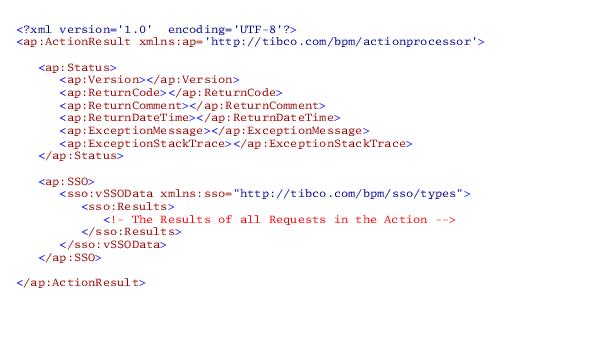
Once the Action Processor has processed all of the individual requests in an action, it consolidates the data under a single XML root element, <ap:ActionResult>. This XML response is then sent back to the client via HTTP.
The format of the XML response is as follows:
Response Status
The XML response to the client contains an <ap:Status> element that indicates whether or not the action was successfully processed. It also contains information to help determine the problem if an error does occur.
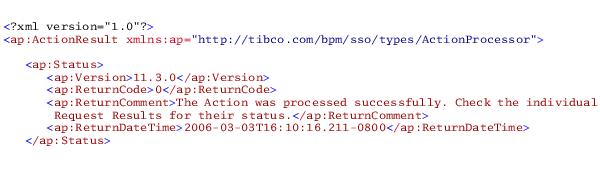
The <ap:Status> element provides the version number of the Action Processor and the date and time the response was returned to the client. For example:
Whether the Action Processor version is displayed in the response status is determined by the IsReturnVersion parameter in the apConfig.xml file. For more information, see TIBCO iProcess Workspace (Browser) Configuration and Customization.
If the <ap:ReturnCode> element contains a 0 (zero), the action was processed successfully.
If the <ap:ReturnCode> element contains any number other than a 0, an error has occurred.
The following table lists all of the possible return codes, as well as the comment that is returned in the <ap:ReturnComment> element for each return code. The comment can be used to help determine the cause of the error.
 
Exception Thrown.1

1
This indicates that an error has occurred somewhere other than in the Action Processor, e.g., in the iProcess Objects Server. For more information see Errors Outside the Action Processor.

The value in the <ap:ReturnDateTime> element is in the form:
yyyy-mm-ddThh:nn:ss.uuu+/-oooo
where:
For example:
2006-04-26T08:02:02.146-0700
In this example, the “-0700” indicates minus 7 hours from GMT.
Errors Outside the Action Processor
If an error occurs somewhere outside of the Action Processor — for instance, in the iProcess Objects Server — the Action Processor will pass the error through and show it in the <ap:Status> element.
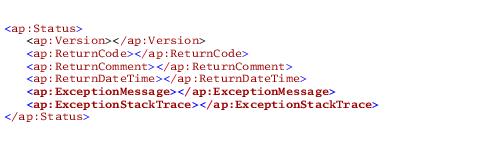
If an error occurs outside the Action Processor, a -1 is returned in the <ap:ReturnCode> element, and two additional elements are shown under <ap:Status>. They are shown below:
where:
<ap:ExceptionMessage> is the exception message that is being passed through by the Action Processor.
<ap:ExceptionStackTrace> provides information on the execution history of the current thread, displaying the names of the classes and methods within those classes that had been called at the point when the exception occurred. Due to security reasons, this section will remain empty in the HTML response but the stack trace can be seen in the Action Processor log.
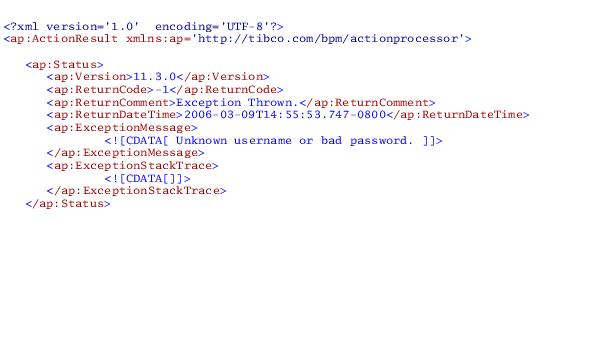
The following shows an example response when an exception occurs outside of the Action Processor:
 

Copyright © Cloud Software Group, Inc. All Rights Reserved