Copyright © Cloud Software Group, Inc. All Rights Reserved

Chapter 1 Introduction : TIBCO iProcess Environment

TIBCO iProcess Environment
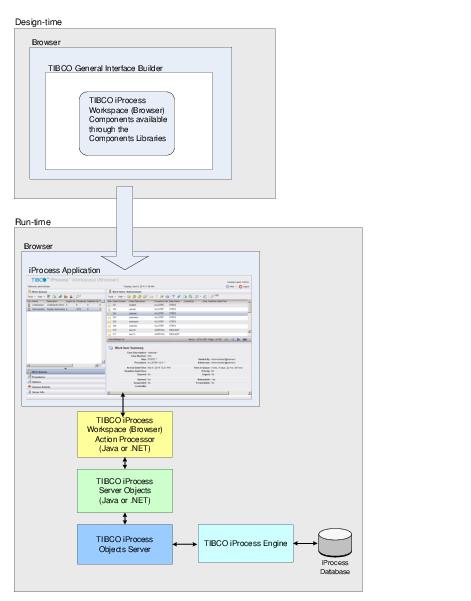
Figure 1 shows the major items/products that are incorporated into an iProcess environment when using TIBCO iProcess Workspace (Browser) components.
Figure 1 TIBCO iProcess Environment Using Workspace (Browser) Components
The following subsections describe the products used in the iProcess environment illustrated in Figure 1.
TIBCO® General Interface
TIBCO® General Interface consists of two components:
TIBCO® General Interface Builder - This is a browser-based, visual development environment used to develop AJAX applications. AJAX (asynchronous communications, JavaScript, and XML) applications are run in a standard browser, but look and feel like a desktop-run application.
TIBCO® General Interface Builder includes a Components Libraries Palette that contains many standard components used to add functionality to your application, such as menus, taskbars, text boxes, etc.
After the TIBCO iProcess Workspace (Browser) components are installed, these “WCC” components1 are also available in the TIBCO® General Interface Builder Components Libraries. The TIBCO iProcess Workspace (Browser) components provide functionality that are iProcess-specific, and provide access to the data stored in the iProcess database.
Information about using and configuring the TIBCO iProcess Workspace (Browser) components in the TIBCO® General Interface Builder is provided in the remainder of the chapters of this guide.
TIBCO® General Interface Framework - This is a distributable runtime framework for running browser-based applications developed with TIBCO® General Interface Builder.
Browser
AJAX applications developed using the TIBCO® General Interface Builder and TIBCO iProcess Workspace (Browser) components are certified to run on most recent browsers. For the specific brower versions, see the readme provided with the product.
As newer versions of browsers are released, they may work with TIBCO iProcess Workspace (Browser), depending on their backward compatibility. Check with TIBCO Support to see if there are any known issues.
No other software (applets, plug-ins, or Active X controls) is required to run applications developed with the TIBCO iProcess Workspace (Browser) components.
See the TIBCO® General Interface Builder documentation for browsers that can be used to develop applications using TIBCO® General Interface Builder.
iProcess Application
AJAX applications developed using the TIBCO® General Interface Builder and TIBCO iProcess Workspace (Browser) components can be full-screen applications, portlets in a portal application, or a specific piece of iProcess functionality embedded in a web page.
The size of the component interface displayed to the user is controlled by the container in which the component is placed.
TIBCO iProcess Workspace (Browser) Action Processor
The TIBCO iProcess Workspace (Browser) Action Processor services action requests made by applications developed using the TIBCO® General Interface Builder.
Each 'action' requested by TIBCO® General Interface Builder GUI components (including TIBCO iProcess Workspace (Browser) components) can contain one or more of the following 'request' types:
The TIBCO® General Interface Builder GUI components send their action details to the Action Processor via a Form POST over HTTP — the action details are sent as XML on an HTML <input> tag.
The Action Processor also accepts actions via an HTTP GET. When doing a GET, the action XML needs to be sent as a URL parameter named 'action'.
Upon receiving an action request, the Action Processor breaks the action into individual requests and processes each one. The resulting data from each request is then consolidated in XML under one root element (<ap:ActionResult>). The Action Processor then returns this XML data to the TIBCO® General Interface Builder GUI components over HTTP (or in the case of a form request, it redirects the HTML — no XML is returned).
The Action Processor is implemented as both a Microsoft .NET ASP Web Application and as a Java Servlet. This has been done so as to satisfy both the Microsoft and UNIX customer base. The implementation of the two Action Processors is obviously very different but the functionality and configuration is the same.
TIBCO iProcess Server Objects
The TIBCO iProcess Server Objects comprise a set of objects that are used to build applications that automate business processes. These objects contain properties/methods that are used to request iProcess data and perform iProcess functions such as starting cases, processing work items, performing administrative functions, etc.
The TIBCO iProcess Workspace (Browser) Action Processor makes calls to the methods available on the iProcess Server Objects, based on requests from the iProcess application. These method calls cause messages to be sent to an iProcess Objects Server, which in turn, makes calls to an API that is exposed on the Process Engine.
There are two types of iProcess Server Objects available:
TIBCO iProcess Objects Server
The TIBCO iProcess Objects Server acts as a gateway between the TIBCO iProcess Server Objects and the TIBCO iProcess Engine. It processes the request, then makes the appropriate call to an iProcess Engine to initiate the desired service or obtain the desired data.
Multiple instances of the iProcess Objects Server can be run to improve load balancing and efficiency. When this is done, you would incorporate a TIBCO iProcess Objects Director. The iProcess Objects Director is a standalone program that maintains a list of TIBCO iProcess Objects Servers that are configured in a node cluster. When a client application needs access to a TIBCO iProcess Objects Server, it first establishes a connection to the TIBCO iProcess Objects Director. The TIBCO iProcess Objects Director then decides, based on a “pick method,” which TIBCO iProcess Objects Server the client should connect to. The list of known TIBCO iProcess Objects Servers is updated dynamically as TIBCO iProcess Objects Server instances are started and stopped.
TIBCO iProcess Engine
The TIBCO iProcess Engine processes all requests from iProcess applications, as well as maintains all data in the iProcess database.
A TIBCO iProcess Engine installation on one machine is known as a TIBCO iProcess Engine node. Installing the iProcess Engine on multiple machines that all use the same database instance is known as a node cluster architecture. In the node cluster architecture, you can have a number of iProcess Engine processes running on different machines to improve load balancing and performance. However, all the iProcess Engine case data such as fields and their values in forms will be stored in one iProcess Engine database instance.
 

1
From within TIBCO® General Interface Builder, the iProcess Workspace (Browser) components are referred as “WCC” components, which stands for “Workspace Client Components”.


Copyright © Cloud Software Group, Inc. All Rights Reserved