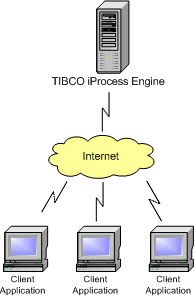
What is the TIBCO iProcess Workspace (Browser)? The TIBCO iProcess Workspace (Browser) is a Business Process Management (BPM) application that runs over the internet or an intranet. As a BPM application, it automates the movement of data/information through your business process, whatever your business may be. It may automate the process of filing an insurance claim, a loan application, or any process that has multiple steps. The TIBCO iProcess Workspace (Browser) application is run in a browser (e.g., Microsoft Internet Explorer). You connect to a TIBCO iProcess Engine over the internet or an intranet by entering a web address that is determined by the location at which your TIBCO software is installed. After connecting to the TIBCO iProcess Engine by entering a valid user name and password, you will be presented with screens that allow you to perform the functions your specific application was designed to perform. Each time you initiate an action in your client application (i.e., by clicking on something), a request is sent to the TIBCO iProcess Engine instructing it to either send data to the client or to perform some sort of action (e.g., save the data you’ve just entered). All data pertinent to your business process is stored in a database on the TIBCO iProcess Engine. The iProcess Workspace (Browser) provides a way for you to access and manipulate that information via the internet.