|
| Copyright © Cloud Software Group, Inc. All Rights Reserved |
The Filter Options section allow you to set the following user options:
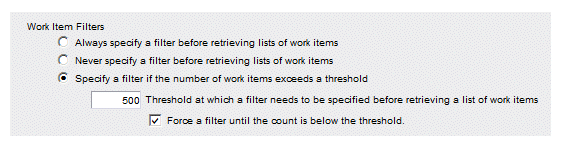
• Work Item Filters - Specifies whether or not to display the filter dialog before displaying the work item list.
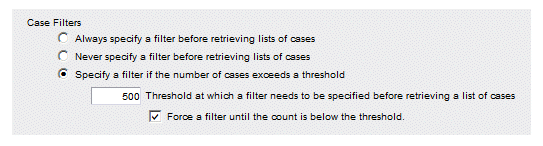
• Case Filters - Specifies whether or not to display the filter dialog before displaying the case list.
1.
2.
3. Using the Work Item Filters radio buttons, select the appropriate option based on the descriptions below:
− Always specify a filter... - If this radio button is selected, the filter dialog is always displayed first when you select a work queue from the work queue list. This allows you to apply a filter before displaying the work item list.
− Never specify a filter... - If this radio button is selected, the filter dialog is not displayed first when you select a work queue from the work queue list. The first page of the work item list is always displayed. If you choose to filter the list later, you can click on the Filter icon and enter a filter expression.
− Specify a filter if the number... - This radio button is used in conjunction with the Threshold field below the Work Item Filters radio buttons. If this radio button is selected, the work item list is displayed only if the number of work items in the work queue does not exceed the number in the Threshold field. If the number exceeds the threshold, the filter dialog is displayed first, allowing you to apply a filter before displaying the work item list.If you specify a threshold value, you can also force the user to filter the work items until the number of work items is below the threshold value. To do this, select the Force a filter... check box. This causes the filter dialog to be displayed, and forces the user to specify a filter that brings the number of work items below the threshold before the work item list is displayed.
4.
1.
2.
3. Using the Case Filters radio buttons, select the appropriate option based on the descriptions below:
− Always specify a filter... - If this radio button is selected, the filter dialog is always displayed when you select a procedure from the procedure list. This allows you to apply a filter before the list of cases is displayed.
− Never specify a filter... - If this radio button is selected, the entire case list is always displayed whenever you select a procedure from the procedure list.
− Specify a filter if the number... - This radio button is used in conjunction with the Threshold field below the Case Filters radio buttons. If this radio button is selected, the case list is displayed when you select a procedure from the procedure list only if the number of cases of that procedure does not exceed the number in the Threshold field. If the number exceeds the threshold, the filter dialog is displayed first, allowing you to apply a filter prior to displaying the case list.If you specify a threshold value, you can also force the user to filter the cases until the number of cases is below the threshold value. To do this, select the Force a filter... check box. This causes the filter dialog to be displayed, and forces the user to specify a filter that brings the number of cases below the threshold before the case list is displayed.
4.
|
| Copyright © Cloud Software Group, Inc. All Rights Reserved |