Action Processor URL
When the client application is installed, you must specify the URL to the Action Processor to which you want the client application to connect when it is started. This URL is written to the client application’s configuration file by the installation program.
You can later modify the Action Processor URL in the configuration file so that the client connects to a different Action Processor. You can also specify multiple URLs, and assign each a weighting value, which is used to determine the percentage of connections given to that URL (Action Processor). This allows load balancing of the available Action Processors. When the client application starts, it randomly selects (with weighting applied) one of the Action Processor URLs specified in the configuration file.
To configure the Action Processor URL:
| 1. | Open the appropriate config.xml file, depending on whether you are configuring the iProcess Client or a custom application. For information about the file’s location, see Configuration Files. |
| 2. | Locate the ActionProcessors record in the config.xml file. For example:
|

| 3. | If you would like multiple Action Processors to be available for connections, add an additional <ActionProcessor /> element for each Action Processor, then perform the following steps to configure each of the components of the <ActionProcessor /> element. (The easiest method is to copy and paste the existing <ActionProcessor /> element, then modify the weighting and baseUrl values according to the descriptions in steps 4 and 5.) |
If you are just modifying the existing URL or weighting value, proceed to the following steps.
| 4. | To specify the Action Processor to which the client should connect, modify the baseUrl attribute string to point to the desired Action Processor(s). This entry must be in the form: |
http://Host:Port/APDir/ActionProcessor.ext
where:
This can also be the IP address (either an IPv4 or IPv6 address) of the host machine. Note, however, if it is an IPv6 address, it must be enclosed in square brackets when in a URL. For example:
http://[2001:db8:85a3:8d3:1319:8a2e:370:7348]:port/restOfURL
| — | Port is the port number used by the Web Application Server (WAS) that is hosting the Action Processor to communicate with web applications. |
| — | APDir is the directory on Host in which the Action Processor is installed. |
The example shown in step 2 specifies that the client application connect to a Java Action Processor (hence the “servlet” extension) on machine “austin”. The WAS hosting the Action Processor is communicating with web applications on port 90, and the Action Processor was installed in the TIBCOActProc directory.
| 5. | Specify a weighting value for each Action Processor by setting the weighting attribute as follows: |
| — | If you are only specifying a single URL, the weighting attribute can be set to any value, or it can be left unspecified. |
| — | For multiple URLs, the weighting value determines the percentage of connections based on the total of all weighting values. For instance, if a URL’s weighting value is 30% of the total of all weighting values (see the example below), the client will connect to it 30% of the time:
|
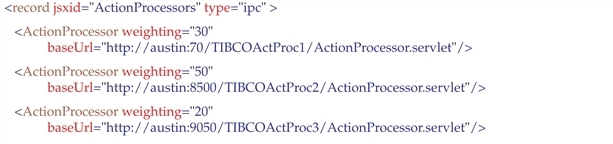
Note that the weighting parameter is only for load balancing purposes — it is not to provide failover. If the Action Processor fails, the application should return to the Login screen.
The weighting values can total any number, although it’s easier to calculate the percentage for each if they total 100 as in the example above.
If an Action Processor is not available when the client attempts to connect to it, the weighting values are recalculated based on the remaining available Action Processors, and another URL is randomly selected. This process continues until a connection is made, or no active Action Processor can be found (in which case, an error is returned — the client application must be reloaded to continue).