Overview
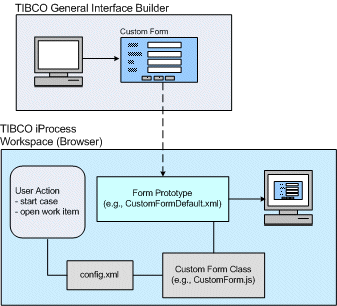
The GI Forms interface allows you to create forms using TIBCO® General Interface Builder, then use those forms for work item steps in the iProcess Workspace (Browser). This allows you to take advantage of the advanced form-building capabilities of the TIBCO® General Interface Builder.
The GI Forms interface allows your custom forms to utilize the existing iProcess Workspace (Browser) communication methods to perform the following functions:
|
•
|
get field data to display in the form |
|
•
|
keep or release the work item |
When a user either starts a case of a procedure or opens an existing work item, the TIBCO iProcess Workspace (Browser) will check to see if there is a GI form specified for that step in the <Forms> element of the client’s config.xml file:
|
•
|
If there is a GI form specified for the step: |
|
—
|
The iProcess Workspace (Browser) instantiates the custom GI form class that is specified in the <Forms> element in the iProcess Workspace (Browser) configuration file (config.xml). This is described in more detail later. |
|
—
|
Field data is requested from the Action Processor (applicable only when opening a work item, not when starting a case). |
|
—
|
The custom GI form (prototype) is displayed within the GI context in the iProcess Workspace (Browser). |
|
—
|
A keep or release request is sent to the Action Processor when the user initiates one of those actions. |
|
•
|
If there is no GI form definition for the step: |
|
—
|
The normal iProcess Workspace (Browser) open work item actions are performed, i.e., a new browser window is opened pointing to the Action Processor URL to handle the form action. This delegates control to the external form handling process. |
|
Note
|
For information about the version of TIBCO® General Interface Builder that must be used if you are developing your own GI forms to use with the iProcess Workspace (Browser), see the Release Notes for the iProcess Workspace (Browser).
|