Server Factories
This parameter specifies the server factories to use when using the Remote Method Invocation (RMI). (This parameter is only applicable for the Java Action Processor.)
The TIBCO iProcess Workspace (Browser) installer asks for server factory information if the interface type is RMI. It then writes that information into the <ServerFactories> element in the apConfig.xml file.
You can modify the server factory information, or add additional <ServerFactory> elements if multiple server factories are used.
To configure the server factories to use:
| 1. | Locate the <ServerFactories> element in the apConfig.xml file:
|
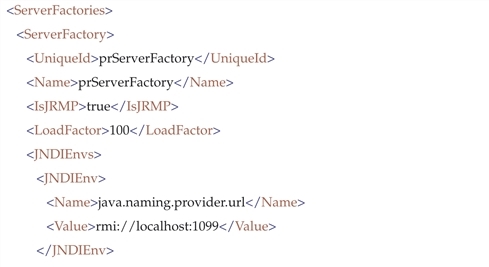
| 2. | Enter values in these elements to specify information about the server factory: |
| — | <UniqueId>: Used to uniquely identify the server factory. |
| — | <Name>: The name of the server factory. |
This defaults to 100. You can can modify this value if you use multiple server factories.
The installer asks for a “Java naming provider URL” (which specifies the location of the registry when the registry is being used as the initial context). The installer adds this value to one set of JNDI environment <Name> / <Value> element pairs (see the example above).
Another set of <Name> / <Value> element pairs is provided that specifies the initial context factory to use (see java.naming.factory.initial in the example above).