Overview
TIBCO iProcess Suite consists of different products. A typical environment could be made up of any number or combination of iProcess products.
The diagram illustrates how data is transmitted between products in the iProcess Suite.
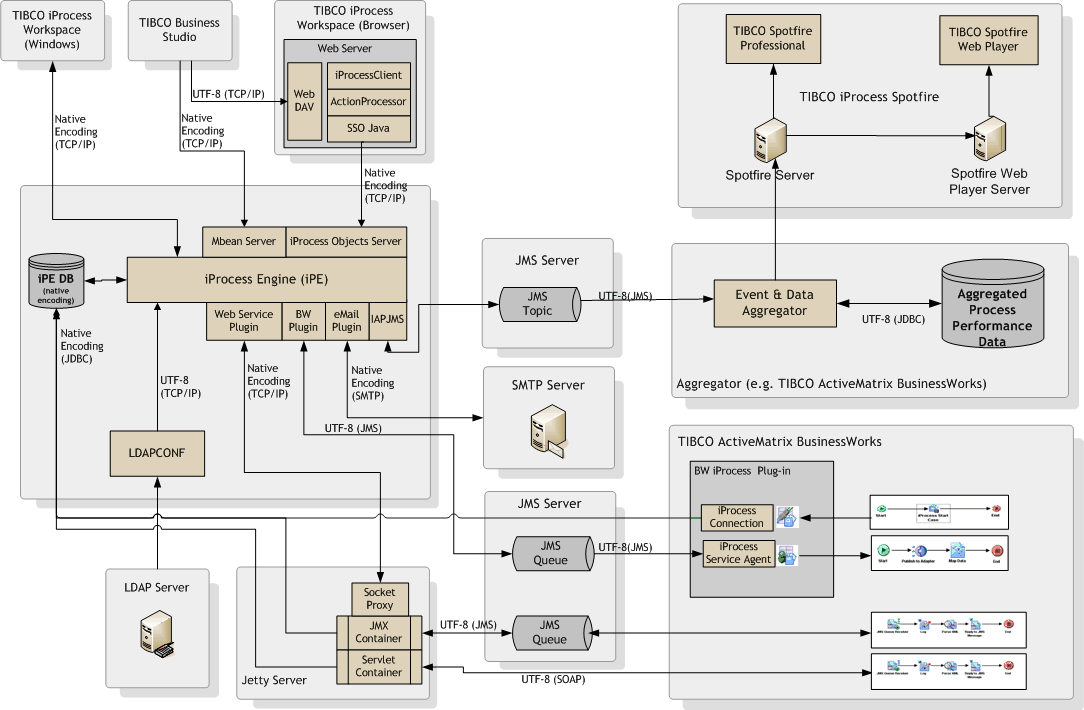
Note that:
| • | The diagram indicates that some components, including the iProcess Engine can use either native encoding or UTF-8. Depending on the encoding used by other components in the iProcess Suite, the iProcess Engine performs the necessary data conversions. For information about setting the encoding attributes for iProcess components, see the documentation supplied with the components. |
| • | The iProcess database can use either UTF-8 or native encoding. This is a choice that you can specify when you install or upgrade the iProcess Engine. |
| — | If you choose to use UTF-8 for the iProcess database, the iProcess Engine also operates in UTF-8. |
| — | If you choose not to use UTF-8 for the iProcess database, the iProcess Engine uses native encoding. |
For your operating system for setting this option, see the TIBCO iProcess Installation guide. You must also see the issues discussed in this chapter before deciding on an encoding."
| • | Each component that communicates with an external application must use the same character set as the external application. See Implementing iProcess Suite in an International Environment with Native Encoding. |