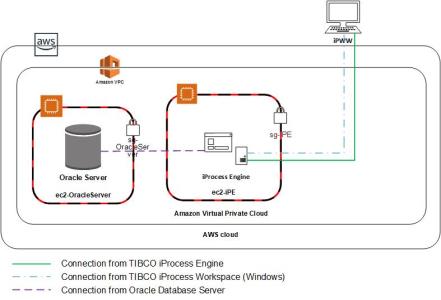
Configuring Security Groups When iProcess Workspace (Windows) Is Installed on an External Machine
To connect to iProcess Engine from an external machine that has iProcess Workspace (Windows) installed, perform the following steps to appropriately configure security groups.
| 1. | Start an EC2 instance in your VPC. |
| 2. | Name the created instance ec2-OracleServer and install the Oracle Database Server on this instance. |
| 3. | Start a second EC2 instance in your VPC. |
| 4. | Name the created instance ec2-iPE and install iProcess Engine on this instance. |
| 5. | Install iProcess Workspace (Windows) on the client machine (on an external domain.) For more information, see TIBCO iProcess Workspace (Windows) Installation for more information. |
| 6. | Create the following security groups for the two EC2 instances: |
| — | sg-OracleServer for the ec2-OracleServer instance. |
| — | sg-iPE for the ec2-iPE instance. |
| 7. | Configure sg-OracleServer |
| a. | Specify a custom TCP rule so only machines on an external domain can access the Oracle Database Server (The default port is 1521.) |
| b. | Specify a rule on ec2-OracleServer for iProcess Engine to communicate with the database server. |
|
Type |
Protocol |
Port Range |
Source |
Description |
|
|
Custom TCP Rule |
TCP |
22 |
Custom |
192.0.2.0/32 |
SSH to access the VM |
|
All TCP |
TCP |
0-65535 |
Custom |
sg-iPE |
To allow traffic from members of sg-iPE |
|
Oracle Database Server |
TCP |
1521 |
Custom |
192.0.2.0/32 |
To access the Oracle database from an external machine |
| 8. | Configure sg-iPE |
| a. | Specify a rule on ec2-iPE for the database server to communicate with iProcess Engine. |
| b. | Specify a custom TCP rule (for example: 46000-46020) to restrict the number of inbound connections to ec2-iPE. |
| c. | Specify a custom TCP rule so that only client machines on an external domain can access iProcess Engine on RPC port (The default is 111.) |
|
Type |
Protocol |
Port Range |
Source |
Description |
|
|
Custom TCP Rule |
TCP |
22 |
Custom |
192.0.2.0/32 |
SSH to access the VM |
|
Custom TCP Rule |
TCP |
46000- 46020 |
Custom |
192.0.2.0/32 |
Port range used by iProcess Engine |
|
All TCP |
TCP |
0-65535 |
Custom |
sg-OracleServer |
To allow traffic from members of sg-OracleServer |
|
Custom TCP Rule |
TCP |
111 |
Custom |
192.0.2.0/32 |
To access iProcess Engine |
Once you configure these security groups, your setup looks something like the following illustration.