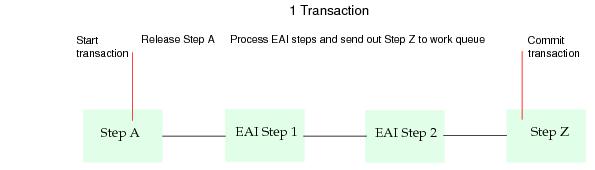
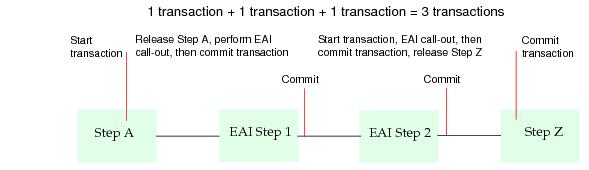
When using EAI steps in your procedure, you need to be aware that case processing is affected by the type of EAI processing used by the EAI steps. When the case gets to an EAI step, an iProcess background process makes an EAI call-out to an external system; that background process cannot process other cases (or other branches of the procedure) while waiting for an EAI call-out to complete.
The EAI call-out is the communication of a request to an external system and the communication of the response to that request by the external system. In general, the procedure can be designed to utilize EAI steps in one of two ways:
When the EAI call-out completes (i.e. a request is made and the reply is received), the BG process reads the EAI step definition to determine if the step should be released immediately.
If the EAI step definition is not set to delayed release, the step’s actions are processed immediately as part of the same transaction. Deadlines are not supported when using Immediate Release.
If the EAI step definition is defined to be delayed release, the actions of the EAI step are not processed immediately when the EAI call-out completes. They are processed when a release instruction is given to the BG process at a later time and in a separate transaction.
Delayed release should be used where the request on the external system can take a long time to complete. In general, delayed release call-outs will queue a request for some work to be done by an external system. The external system picks up this request, processes it and then uses TIBCO iProcess Objects or
pstaffifc APPRELEASE to tell iProcess that the step is complete. If you need to keep the external system in synchronization with the iProcess case then the EAI plug-in and external system must be able to support withdraw requests and remove the appropriate externally queued request.
If you have an EAI call-out that takes 5 minutes to return some query results, you do not want to block the background process for 5 minutes while it waits for the response. In these situations, you need to use delayed release so that the BG process can continue processing other work.
Some EAI plug-ins may not support delayed release (i.e. the application does not enable the procedure definer to select it). In this case, the Delayed Release tab should be disabled (grayed out) in the EAI step definition dialog. Some EAI plug-ins may force all call-outs to be delayed release if the external system always requires this.