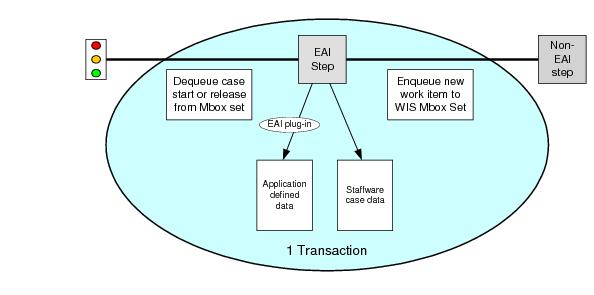
In many enterprises, business processes are controlled by many disparate systems including databases, document management systems and legacy systems. It can be difficult to integrate the systems to keep control of a business process and make sure that all of the data is kept synchronized. Data updates to various parts of the system can fail due to systems being down while other updates have been successful. This can lead to integrity errors in the business process such as bank accounts being debited but not credited.
EAI steps can be used to make updates to third party systems under transaction control. For example, a COM+ EAI step can call out to a COM application that performs some data checks. The MSDTC transaction manager program can register the COM application as being part of the same transaction as iProcess so that the business process can operate as a single transaction.
Each EAI step can only be part of the same transaction that is controlled by the iProcess background process. By default, the iProcess background process bundles all consecutive/concurrent EAI steps into the same transaction. If there is a failure in one step then all steps are rolled back. However, you can control the granularity of the transaction for the EAI steps using one or more Transaction Control (TC) steps. You can break up a single transaction into multiple transactions as you require or design the procedure flow so that one branch can start in one transaction while another branch is started as another transaction. See
Using Enterprise Application Integration (EAI) Steps for more detailed information about controlling transactions using a TC step.
By combining multiple EAI steps in sequence or in parallel, multiple external updates can be processed quickly by the background case instruction processes. The external resources can be completely separate systems involving a mixture of new and legacy systems. If these are operating in the same transaction environment, iProcess can control the entire business process in a single transaction.