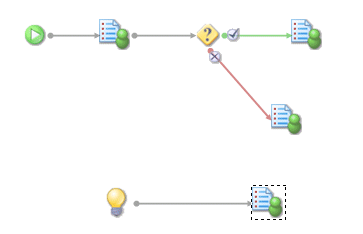
Events can be used to start up an entire branch of a case as a result of some external trigger. To achieve this effect, the Event object in the TIBCO iProcess Modeler has no links to the left hand side (and therefore no ‘suspend’ functionality). It does however have one or more links from the right hand side, denoting that one or more actions will be processed when the Event is triggered.
For example, consider a holiday booking process. Details of a customer’s requirements are initially input in an external holiday booking system and a case of an iProcess procedure is started automatically to process the necessary fulfilment activities. After the case has started, additional requirements may be input to the external system. This results in the automatic triggering of an Event, which causes the delivery of another work item which advises the caseworker of the change in requirements.