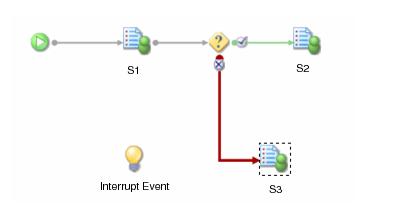
An external process can interact with an iProcess procedure by updating field values in a case that is already running. For example, you might want to update a field in a case with a new interest rate or update the values of several CDQP parameters.
|
2.
|
use the swutil EVENT -p command with an abox file that contains the new field values. Detailed information about using swutil EVENT can be found in “Events” in TIBCO iProcess swutil and swbatch Reference Guide.
|
There are a number of ways in which you can control how and where a field is updated. For example, you can change the value of a field in a sub-case without changing the value of the field in the parent case or you can specify a new value that will be passed to a specific case started from a dynamic sub-procedure call.
For every case of a procedure, work items for each addressee are given a working copy of the values of all assigned fields in a case from the central case data (stored in the
case_data database table). This working copy of data is known as pack data (stored in the
pack_data database table). The pack data is modified by users or programs working on the work item(s) so if any fields are changed, they are changed in the pack data first and then copied to the case data when the work item is released.
When updating case data, only the field values specified in the abox file are updated in the case. All other field values in the case are unchanged. This allows you to use
swutil EVENT to selectively update field values in work items. (By comparison, a
swutil RESEND completely recreates a work item, overwriting all local
pack_data in the work item. The
RESEND command updates all fields in all outstanding steps to the values in the case data so any changes made in steps that are Kept (not Released) are lost.)
By using different formats for the new field values in the abox file, you can have more control over which fields you update. For example, you can update a specific field in a particular sub-case or change the input parameter to a sub-case - see
Explicitly Updating Fields in Sub-Procedures.
This section describes how new field values supplied in an abox file using
swutil EVENT -p are propagated through a case.
By default, if a new field value is supplied in an abox file, the new value is propagated through the parent case and down to any sub-cases via the appropriate field mappings defined by the step that initiated the sub-case. The
case_data and
pack_data database tables are updated for both the parent case and all affected sub-cases.
To update case data in your procedure, you need to define an Event step in the procedure with no actions (i.e. no links from the right or the bottom of the Event object). This Event is not part of the procedural flow, i.e. it is not an action from any other step.
An external process can then issue a swutil EVENT -p command, specifying the name of the event step and an
abox file containing the new field values. The field values supplied in the
abox file are applied to the fields for this case of the procedure.
See "swutil EVENT" in
TIBCO iProcess swutil and swbatch Reference Guide for detailed information about the syntax for using
SWDIR\
bin\
swutil.
See abox Files for more information about the format of an
abox file. There are various ways you can control what fields are updated in the case by specifying a different field format in the
abox file.
The following examples demonstrate how you can use SWDIR\
bin\
swutil with an
abox file to update a field in a main procedure (Example 1) and in a sub-procedure (Example 2):
For the procedure called CARPOOL, case number 100, event step called EVENTUPDATE where you want to modify the value in the INTRATE field from
5 to
4.5, enter the following:
swutil EVENT carpool 100 eventupdate c:\temp\abox1 -p
where the abox1 file contains the following entry:
The new value of 4.5 is automatically propagated down to any sub-cases in case number
100 that use this field.
If you want to change a specific field value called INTRATE in a sub-case with a sub-procedure call step name of SUB1 without changing the calling field value (in the parent case), enter the following in the
abox file:
SUB1|INTRATE, 4
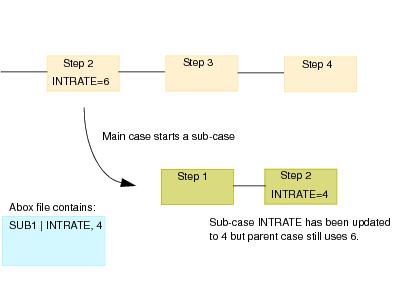
See abox Files for more information about the format of
abox files and See
TIBCO iProcess swutil and swbatch Reference Guide for the complete command line syntax for
swutil EVENT.
There are three ways in which you can update a sub-procedure field using Process Variables. Each method is listed below in the order of precedence (highest first).
This means that if a new field value is updated in a parent case and also explicitly in a sub-case, the new value defined for the sub-case takes precedence over the automatically propagated value.
Because of the different ways sub-procedures can be called there are slight differences in how updated fields are propagated to the sub-cases or how you explicitly change a sub-case field. The following table shows the sub-procedure call types and which methods can be used to update fields in the sub-cases:.
See abox Files for more information about the syntax you need to use in the
abox file to update case data in these sub-procedure types.
|
•
|
If a work item is open when the event updates its pack_data, when the user tries to keep or release the work item they will receive an error message informing them that the work item has been updated elsewhere since they opened the work item. The keep or release operation is cancelled and any changes to field values made by the user are lost. Updates to field values made by the event are applied. (The user can then re-open the work item and make their changes again.)
|