Copyright © Cloud Software Group, Inc. All Rights Reserved


Chapter 6 Using TIBCO Formflows : Defining a Formflow in a Procedure

Defining a Formflow in a Procedure
To use formflows with your procedure, you must define a form that has a form type of Formflow Form (FORMFLOW) in your procedure. How you define the formflow form depends on the scenario that you want to use:
if you want a formflow to open a work item. When defining a step that opens a formflow, you must define a step whose form type is Formflow Form (FORMFLOW). This is so that you can specify which procedure fields, if any, can be passed between the formflow and the procedure.
if you want a step to open a formflow. As well as identifying the form type of the step as Formflow Form (FORMFLOW), you must put in a reference to the specific formflow that the step is to launch. You can then specify which procedure fields, if any, can be passed between the procedure and the formflow.
To define a formflow in your procedure, do the following:
1.
Define a step in your procedure. See "Defining a step" in TIBCO iProcess Modeler Getting Started for more information.
2.
From the Step Definition dialog, select Formflow Form (FORMFLOW) from the Form Type drop-down list.
3.
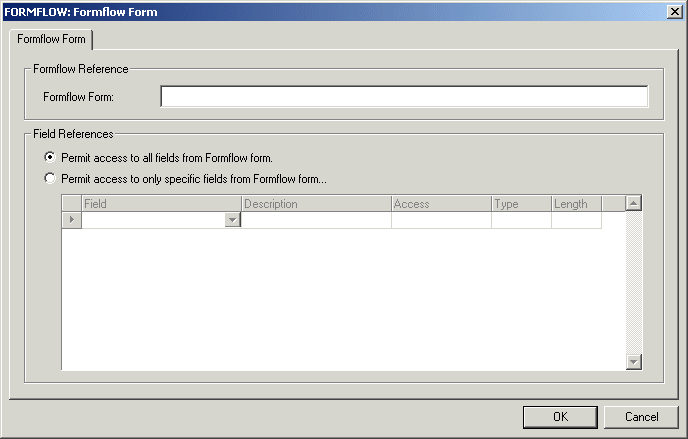
Click Edit. The Formflow Form dialog is displayed.
4.
(Optional) In the Formflow Form: box, enter the reference to the formflow that you want to display when a case of this procedure is started. The reference is in the format formflowrurl\formflow where:
formflowurl is the URL of your formflow application.
formflow is the name of the actual formflow you want to display when a case of this procedure is run.
See TIBCO BusinessWorks FormBuilder User’s Guide for more information.
If the work item is only going to be accessed from a formflow, you do not need to enter a reference. You only need to enter a reference if you want the procedure to launch a formflow.
5.
(Optional) When you have selected the reference to the formflow you want to display, you can select a list of the procedure fields that can be accessed from the formflow. You can specify all or some of the fields. From the Field References area of the Formflow Form dialog, select either:
Permit access to all fields from Formflow form.... The formflow can access all the fields in the procedure.
Permit access to only specific fields from Formflow form.... You can specify which procedure fields the formflow should have access to. The following table describes how to do this:
Read Only. This means the formflow can only read from the field, it cannot write any data to it.
Optional. This means the formflow can read from or write to the field, depending on how you have defined your procedure.
Required. This means the formflow must write some data back to the field.
Automatically retrieved from the field definition. See "Defining Fields" in TIBCO iProcess Modeler Getting Started.
Click OK. The step has been defined with a form type of Formflow Form (FORMFLOW) and the following icon is displayed: .

Copyright © Cloud Software Group, Inc. All Rights Reserved