Copyright © Cloud Software Group, Inc. All Rights Reserved


Chapter 4 Using Graft Steps : Example of Using a Graft Step

Example of Using a Graft Step
The following example demonstrates the use of a graft step to attach several processes to your iProcess procedure when a case is run. This example is based upon using a financial application as the external application and this triggers the graft step using a TIBCO iProcess Objects call.
Brief
Create a procedure for an online banking, account management procedure. iProcess is used to control the flow of the process but the financial application determines what account processes are run e.g. transfer funds, account balance, pay bill, etc. The application triggers the required processes based upon the details captured by case data in iProcess. Some of the processes are external to iProcess but some are defined as iProcess sub-procedures.
Example Procedure Design
Running a Case of the Procedure
1.
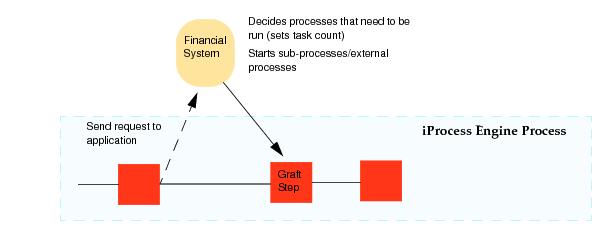
A case of the procedure is started by a customer. As the case progresses and details of the account are entered, iProcess sends a request to the financial application so that it can determine what processes need to be started.
The request consists of a call to the financial system to “manage the account”. The financial system decides what processes need to be run as part of this request and sets the task count based upon the number of processes it needs to run - for example, a get account balance process and an issue new card process is required. The task count is communicated to iProcess via the SetGraftTaskCnt method.
2.
In this example, a new debit card and an account balance is required by the customer. These two processes are started by the application and grafted to the graft step in the main procedure.
3.
The process to order a new debit card is an iProcess sub-procedure while the get account balance process is an external process that is performed by the financial system. The TIBCO iProcess Objects StartGraftTask method is used to start the processes and to attach them to the graft step.
4.
After the new debit card sub-procedure completes and the external application has marked the get balance process as complete, the return values are passed back to the application using the graft step output mappings. When the task count reaches 0, the graft step is complete and is released. The financial system has to inform iProcess that the external process has been completed before the step can be released.

Copyright © Cloud Software Group, Inc. All Rights Reserved