The level of integration you need to perform depends upon the systems you use in your business processes and how you want these to be linked to your iProcess procedures. You can use any combination of the iProcess integration features for your solution.
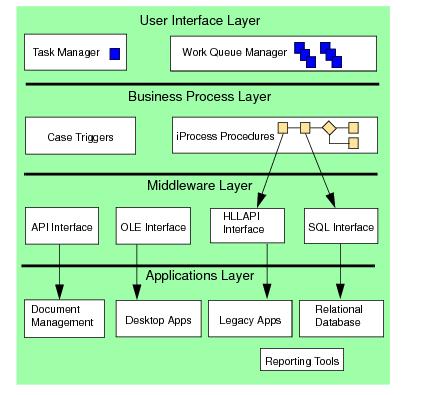
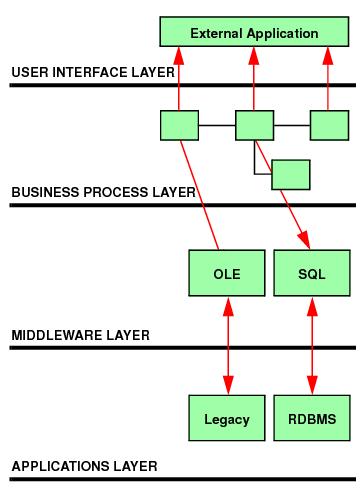
The basic model of any integration is shown in the following diagram. An integration can be split into the user interface, business process, middleware and application layers. iProcess performs the interfaces to the middleware components which in turn provide the interfaces to the specific applications.
iProcess Workspace (Windows) uses the Work Queue Manager for the main interface for displaying work items. iProcess forms are used to provide the interface for the content of the work items.
You can provide alternative user interfaces using the Open Forms functionality. For example, work items are delivered to the Work Queue but when the user opens a work item a customized form is displayed. This could be designed in Visual Basic, Oracle Forms or Delphi, for example. See
Using Open Forms.
For example, you can implement the Staffware Application Layer (SAL) API or TIBCO iProcess™ Objects in external software. This means that work items are still delivered to iProcess work queues but the functions to manage those queues are controlled by bespoke applications. However, if you use this method, you also have to control the locking of work items, running of command scripts, and displaying a form populated with data retrieved from iProcess by calling SAL functions or TIBCO iProcess Objects methods.
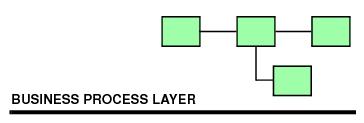
This layer consists of one or more iProcess procedures that define the business processes. The TIBCO iProcess Engine processes the rules in the procedure and controls who does what and when, delivers appropriate work to the correct users and manages work items if it does not get processed in time.
There may be business process triggers or interfaces to other applications that can cause other instances of procedures to start such as when an event takes place (scanning a document or receipt of a file, etc).
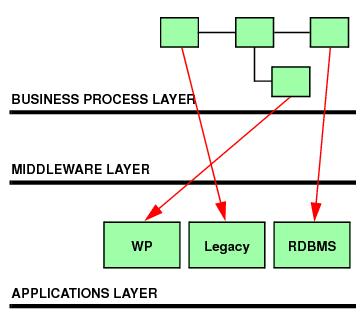
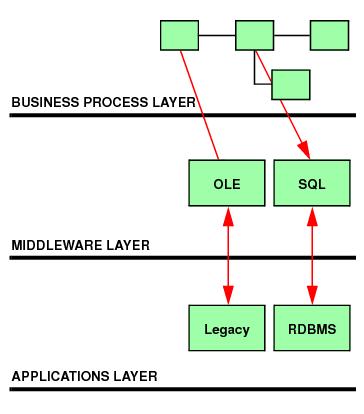
The middleware layer is basically the interface to the external applications. The interface exposes pre-defined functions to iProcess and iProcess can call these by an agreed command line syntax. The interface is controlled by command arguments and usually exchanges data with iProcess using simple text files.
This layer contains all the external applications (such as relational databases, document management software, etc.) that contain information which needs to be delivered to users during a procedure, or updated by iProcess. For example, an Oracle database is used to store case data; the middleware layer provides the generic SQL interface to enable iProcess to retrieve and update information in the database.
This is where iProcess is used as a standalone business process solution. No integration is developed with other applications so the procedures just guide users through a business process using the standard iProcess forms.