|
| Copyright © Cloud Software Group, Inc. All Rights Reserved |
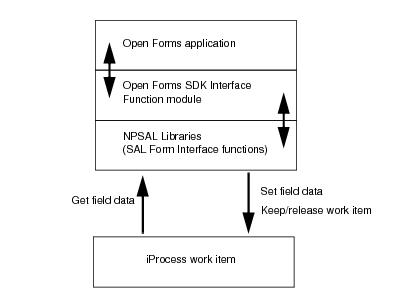
When a work item is opened that has an Open form defined, the Form window is hidden or aborted and control of the work item’s form data is passed to the Open Forms application. The application must then:
• when the form is closed, pass any changed data back to iProcess, and inform iProcess whether to keep or release the work item.The Open Forms SDK is a toolkit which you can use to develop an Open Forms application. It is supplied with the TIBCO iProcess Modeler and is currently available for C/C++ and Microsoft Visual Basic (VB).
• Interface Function module. This is a source code module that you can include in the build of your Open Forms application. It provides interface functions (openform_xxx()) which you can call to get and set a work item’s field data and keep or release the work item. See Developing the Open Forms Application.
• Swemail example application. Swemail is a simple application that demonstrates how to implement Open Forms. Full source code, an executable version and an iProcess procedure are all supplied.For more information about Swemail, see the Opfrmsdk.pdf file, which you can find in the docs directory on the TIBCO iProcess Modeler distribution CD.The Open Forms SDK Interface Function module provides simple interfaces which call the Staffware Application Layer (SAL) Form Interface functions in the NPSAL libraries. The SAL interfaces are used to get and set field data and to keep or release a work item.Using the Open Forms SDK makes it easier to develop an Open Forms application, because you do not need to load the NPSAL libraries and access the SAL Form Interface functions directly.
• If you want to implement Open Forms using a language for which the Open Forms SDK is not available, you can do so by using the SAL Form Interface directly.
• You can use the Open Form SDK and the SAL Form Interface in the same application if you need to. For example, if you want to access SAL Form interface functions that are not provided by the Open Forms SDK.For more information about the SAL Form interface, see the Openuser.wri file, which you can find in the docs directory on the TIBCO iProcess Modeler distribution CD.
1. Develop your Open Forms application, using the Open Forms SDK Interface Function module functions to access work item data.
2. Define an iProcess script to call the Open Forms application. The script must pass the tools window and form session handles to the Open Forms application and hide or abort the iProcess form.
3. Call the script whenever a work item is opened.
|
| Copyright © Cloud Software Group, Inc. All Rights Reserved |