In the following example, the release of STEP1, the execution and release of all the EAI steps and the sending out of STEP2 is included in a single transaction. A failure of any one of the EAI steps would result in the whole transaction being rolled back to STEP1:
By adding a TC step before EAI2, the first transaction consists of the release of STEP1 and the execution and release of EAI1. The second transaction is the execution and release of EAI2 and EAI3 and the sending out of STEP2. This means that if a failure occurred in the remaining EAI steps (EAI2 and EAI3), the business process is only rolled back to EAI1.
You can use either a Commit and Continue or a
Commit and Concede TC step in this situation. See
Types of TC Steps.
By adding a TC step after STEP1, the first transaction is the release of STEP1 and the sending out of STEP2. The second transaction starts with the execution of EAI1 and concludes with the release of EAI3. This means that if a failure occurs within the EAI steps in the first branch, only the EAI steps are rolled back. STEP2 is not rolled back.
You can use either a Commit and Continue or a
Commit and Concede TC step in this situation. See
Types of TC Steps.
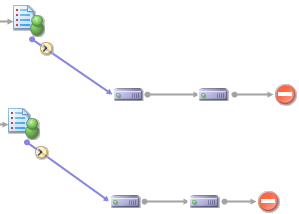
In the procedure shown below, if the deadlines on STEP1 and STEP2 expire at the same time, all of the EAI steps are processed in the same transaction. This means that if one of the EAI steps fail, every EAI step in the parallel branches are rolled back.
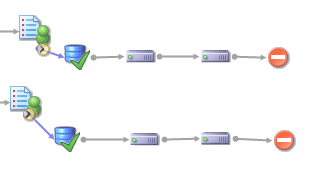
The procedure below illustrates how adding a TC step after STEP1 and STEP2 can separate the parallel branches so that each branch is processed as a separate transaction.
You can use either a Commit and Continue or a
Commit and Concede TC step in this situation. See
Types of TC Steps.
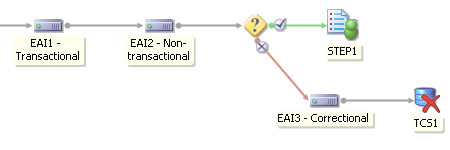
Using TC steps you can now define an abort TC step in a procedure. The procedure below illustrates how to use a TC step to abort a mixture of transactional and non-transactional EAI steps. This is useful because when non-transactional steps are rolled back, they are just re-tried. By using an abort TC step you can build into the procedure a method for handling errors so that a transaction can be re-tried without having to re-process the case.
In the procedure below, if the condition is not met EAI3 carries out a correction activity on non-transactional EAI2. This happens outside of the transaction. Then TCS1 aborts the whole transaction and rolls the procedure back to EAI1. The next time the transaction is tried it should progress successfully because the problem with non-transactional EAI2 has been resolved.
You must use an Abort TC step in this situation. See
Types of TC Steps.